Most AWS environments don't fail because someone picked the wrong instance type. They fail because of decisions made in the first two weeks: one shared account for everything, a /24 VPC that ran out of IPs, an IAM user with admin keys sitting in a CI variable since 2021.
I've spent years cleaning up environments like that, and the pattern is always the same. Nobody chose a bad architecture. They just didn't choose one at all, and the defaults piled up.
This guide covers the AWS architecture best practices that matter once real users and real money are involved. It isn't a rewrite of AWS documentation. It's the list I wish someone had handed me before my first production migration.
Start With Accounts, Not VPCs
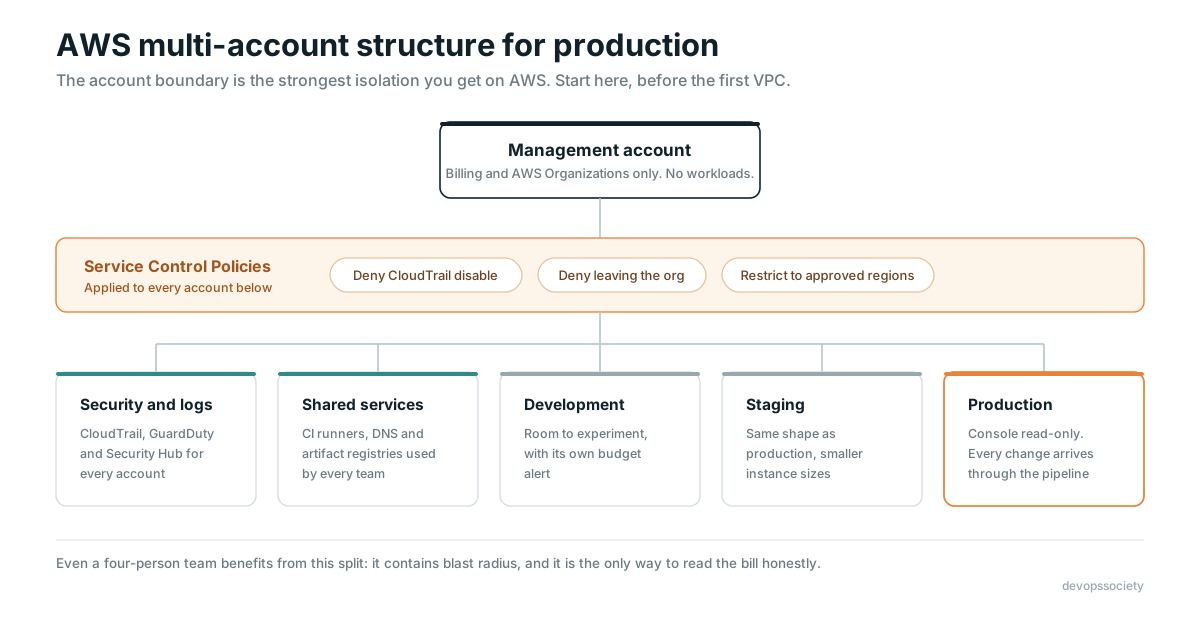
The single most useful thing you can do on AWS is stop putting everything in one account.
An AWS account is the strongest isolation boundary you get. IAM policies can be misconfigured, security groups can be too open, but a workload in a separate account simply can't touch resources in another one unless you explicitly allow it. That's why a multi-account strategy is the foundation of every serious AWS setup.
A sensible starting layout looks like this: a management account that does nothing except billing and AWS Organizations, a security or audit account for logs and security tooling, a shared services account for things like CI runners and DNS, and then separate accounts for dev, staging, and production.
Use AWS Control Tower or at least AWS Organizations with Service Control Policies (SCPs). A few SCPs pay for themselves on day one. Deny disabling CloudTrail. Deny leaving the organization. Restrict usage to the regions you actually operate in. If your team works out of India and your customers are here, there's rarely a good reason for someone to be spinning up resources in São Paulo.
Separate accounts also make your AWS bill readable. When production and a developer's forgotten experiment share an account, cost conversations get painful fast.
Design a VPC You Won't Regret
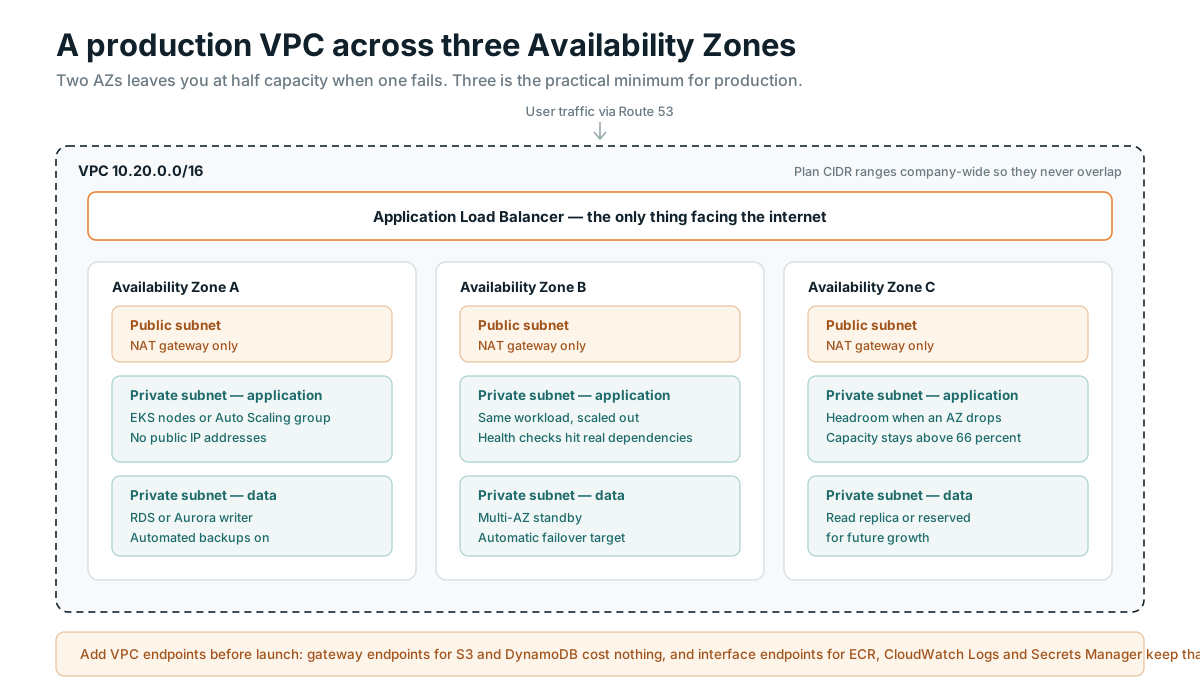
Networking is the hardest thing to change later, so spend an extra hour here.
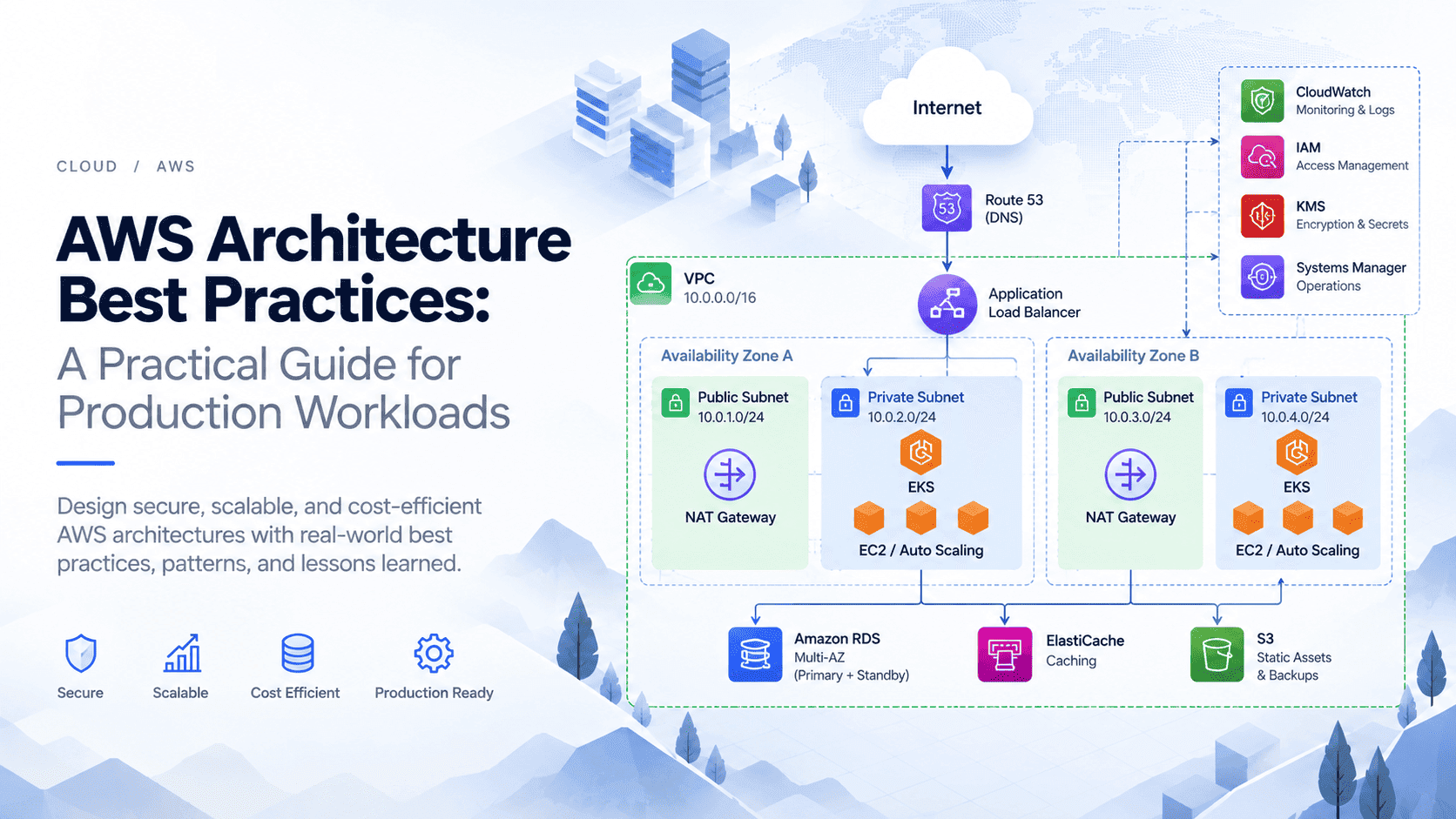
Plan your CIDR ranges across the whole company, not per VPC. If every team picks 10.0.0.0/16, you'll hit overlapping ranges the moment you need VPC peering or Transit Gateway. Keep a simple IP allocation sheet and give each account its own non-overlapping block. A /16 per production VPC is not wasteful, especially if you run EKS, where pods eat IPs quickly.
Spread across three Availability Zones. Two AZs technically gives you redundancy, but losing one leaves you running at half capacity with no margin. Three AZs is the practical minimum for production.
Keep workloads in private subnets. Only load balancers and NAT gateways belong in public subnets. Your application servers, databases, and containers should have no public IP at all.
Watch the NAT Gateway bill. This one catches almost everyone. NAT Gateways charge per hour and per GB processed, and when your instances pull container images, talk to S3, or push logs, all of that traffic can flow through NAT. Add VPC gateway endpoints for S3 and DynamoDB (they're free) and interface endpoints for services like ECR, CloudWatch Logs, and Secrets Manager where traffic volume justifies it. I've seen teams cut a four-figure monthly NAT bill down to almost nothing with three endpoints.
IAM: Least Privilege That People Actually Follow
Everyone agrees with least privilege. Very few environments actually practice it, usually because strict policies slow people down and they eventually get replaced with AdministratorAccess.
A few rules make it workable:
No long-lived IAM users for humans. Use IAM Identity Center (formerly AWS SSO) connected to your identity provider, and let people assume roles with temporary credentials. When someone leaves the company, you disable one account instead of hunting for access keys.
No long-lived keys for machines either. EC2 instances get instance profiles. EKS pods get IAM Roles for Service Accounts or EKS Pod Identity. GitHub Actions and GitLab CI can authenticate to AWS through OIDC federation, so there's no reason for static keys to live in your pipeline secrets anymore.
Enforce IMDSv2 on every instance. It closes off a whole class of SSRF attacks that have caused real, public breaches.
Start policies broad in dev, then tighten them using IAM Access Analyzer, which can generate policies from actual CloudTrail activity. It's much easier to trim permissions based on evidence than to guess them upfront.
Design for Failure, Because It Will Happen
AWS is extremely reliable, but individual components fail all the time. Instances get retired, disks degrade, an AZ has a bad afternoon. Your architecture should treat these as normal events.
Put stateless application tiers behind a load balancer in an Auto Scaling group or on EKS/ECS spread across AZs. Make sure health checks test something meaningful. A health endpoint that returns 200 while the database connection pool is exhausted is worse than no health check.
For databases, use RDS or Aurora with Multi-AZ enabled for production. It's more expensive, and it's worth it. Single-AZ production databases are one of the most common things I find in audits, usually with a comment like "we'll fix it after launch."
Backups deserve their own paragraph. Enable automated backups, use AWS Backup for cross-service policies, and copy critical backups to a separate account. Then actually restore one. A backup you've never restored is a hope, not a plan. Write down your RTO and RPO for each system and check that your setup meets them.
Multi-region is a real option, but be honest about whether you need it. Active-active across regions doubles your complexity. For most businesses, a solid multi-AZ design plus a tested cross-region backup restore is the right trade-off.
Everything in Code, Nothing in the Console
If it was built by clicking, it can't be reviewed, reproduced, or reliably rebuilt. Infrastructure as Code isn't optional for production.
Terraform (or OpenTofu) remains the most common choice, with CloudFormation and CDK as solid alternatives if you're all-in on AWS. Whichever you pick, a few practices matter more than the tool itself.
Store Terraform state remotely in S3 with versioning and encryption, and enable state locking. Recent Terraform versions support native S3 locking, so you no longer strictly need a DynamoDB table for it.
Split state by environment and by blast radius. One giant state file for your entire company means every terraform plan is slow and every mistake is expensive.
Run plans in CI and require review before apply. The console should be read-only for most people in production. When someone does make a manual change during an incident, treat it as a drift ticket to fix in code afterward.
Build Observability Before You Launch
You don't want to be adding logging during your first outage.
At minimum, production needs centralized logs, metrics, and alerts that someone actually receives. CloudWatch covers a lot of this natively. Many teams pair it with Prometheus and Grafana, especially on Kubernetes, or with a managed option like Amazon Managed Service for Prometheus.
Alert on symptoms users feel, such as error rate, latency, and failed transactions, rather than on every CPU spike. A team that gets 40 alerts a day learns to ignore all of them.
Set log retention deliberately. CloudWatch Logs defaults to keeping data forever, and ingestion plus storage for chatty applications can quietly become one of your larger line items. Thirty or ninety days in CloudWatch, with long-term archives in S3, is a reasonable pattern.
Security Baseline Every Production Account Needs
Security on AWS is mostly about turning on the right things early and not turning them off.
Enable an organization-wide CloudTrail that writes to the dedicated security account. Turn on GuardDuty and Security Hub across all accounts and regions you use. Encrypt data at rest with KMS, which is often just a checkbox now. Keep secrets in Secrets Manager or Parameter Store, never in environment variables baked into images or committed to Git.
Patch regularly using Systems Manager Patch Manager, and use Session Manager instead of SSH. Once you've gone a few months without opening port 22 to anything, you won't want to go back.
Finally, block public access on S3 at the account level. If a bucket genuinely needs to be public, serve it through CloudFront instead.
Treat Cost as an Architecture Decision
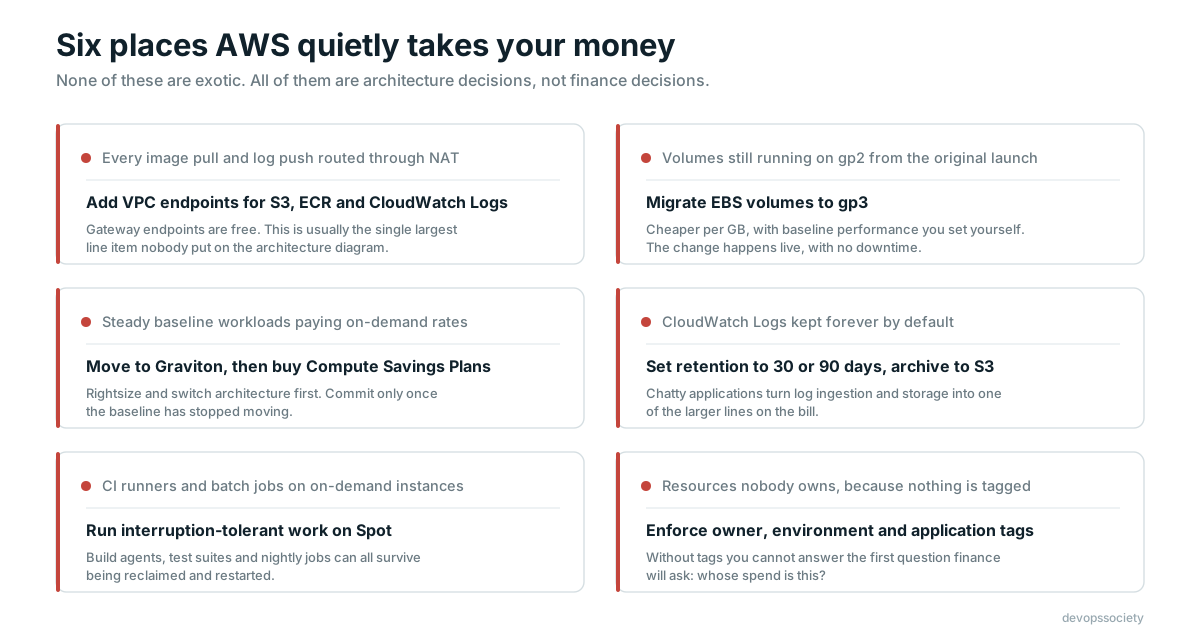
Cost optimization isn't something you do once a quarter when finance complains. It follows directly from how you design.
Tag everything with at least owner, environment, and application, and enforce tags through SCPs or tag policies. Without tags, you can't answer the most basic question: who is spending this money?
Some reliable wins: move to Graviton instances where your stack supports ARM (most modern runtimes do), switch EBS volumes from gp2 to gp3, use Spot for fault-tolerant workloads like CI runners and batch jobs, and buy Compute Savings Plans once your baseline usage is stable. Set up AWS Budgets with alerts per account so surprises show up in days, not at month end.
And keep an eye on data transfer. Cross-AZ traffic, NAT processing, and internet egress are the costs that architecture diagrams never show.
Deploy Safely and Roll Back Faster
A good architecture can still be undone by a bad deployment process.
Use blue/green or canary deployments for anything user-facing, whether that's through CodeDeploy, ALB weighted target groups, or Argo Rollouts on Kubernetes. Make rollback a single, practiced action. Keep database migrations backward compatible so the previous version of your app still works if you need to roll back.
Small, frequent deployments are safer than big monthly ones. That's less a philosophy than simple math: smaller changes are easier to understand when they break.
A Quick Pre-Production Checklist
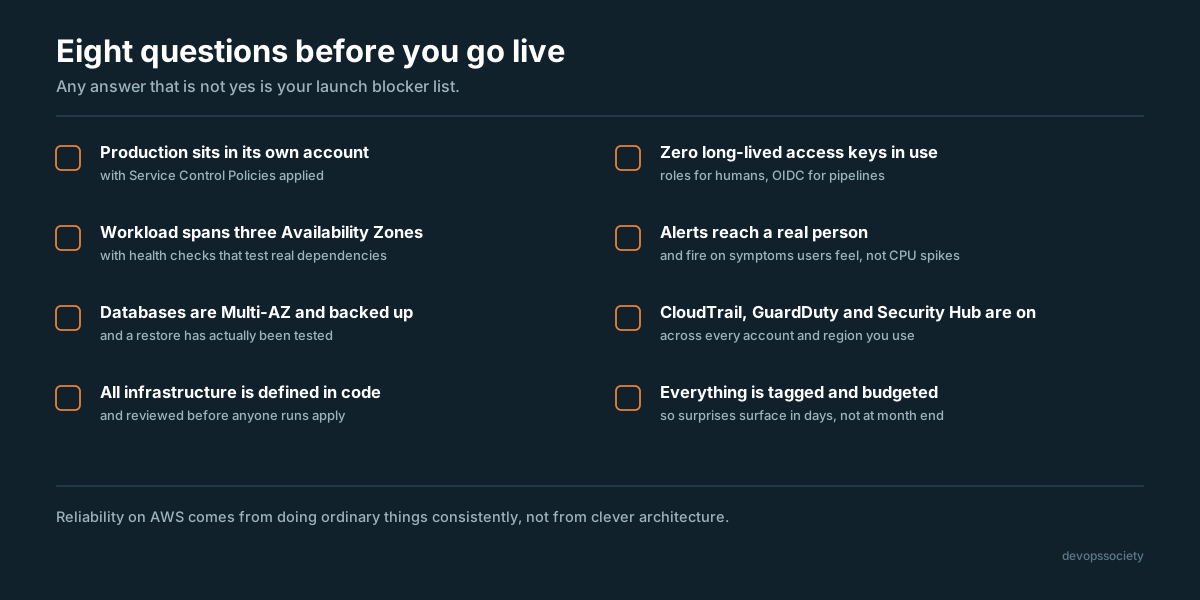
Before a workload goes live, I run through these questions:
Is production in its own AWS account with SCPs applied?
Is the workload spread across at least three AZs with meaningful health checks?
Are databases Multi-AZ, backed up, and has a restore been tested?
Is all infrastructure defined in code and reviewed before apply?
Are there zero long-lived access keys in use?
Do alerts go to a real person, and do they fire on user-facing symptoms?
Are CloudTrail, GuardDuty, and Security Hub enabled?
Is every resource tagged, with a budget alert configured?
If any answer is "no," that's your to-do list before launch.
Frequently Asked Questions
What is the AWS Well-Architected Framework?
It's AWS's set of design principles organized into six pillars: operational excellence, security, reliability, performance efficiency, cost optimization, and sustainability. It's a useful checklist, and the free Well-Architected Tool in the console lets you review workloads against it.
How many AWS accounts should a small company have?
Even a small team benefits from at least four: management, security/logging, non-production, and production. You can add more as teams and products grow.
Is multi-region necessary for production on AWS?
Not for most workloads. A well-built multi-AZ architecture handles the vast majority of failures. Multi-region makes sense when your business can't tolerate a regional outage or when you have regulatory or latency reasons to be closer to users in different geographies.
What's the easiest AWS cost saving for most teams?
Usually a mix of VPC endpoints to reduce NAT charges, gp3 volumes, rightsizing oversized instances, and Savings Plans for steady workloads.
None of these AWS architecture best practices are exotic. That's the point. Production reliability on AWS comes from doing ordinary things consistently: isolate with accounts, keep things private, automate everything, watch everything, and assume something will break.
Get these foundations right early and you'll spend your time building features instead of untangling decisions nobody remembers making.
Have a question about your own AWS setup? Drop it in the comments or reach out to the DevOpsSociety community.