When someone shows me a slow API, I ask one question before I open a dashboard. What is this service doing that has nothing to do with answering the person waiting on it?
The list is usually longer than anyone expected. It is reading a 40 MB PDF. It is taking payment webhooks from a provider that just decided to replay six hours of events. It is building a CSV for someone in finance. It is running a cron job on every pod because nobody got round to fixing that. And all of it shares threads, database connections and an autoscaling group with the login endpoint.
After more than eight years running production systems, I would put this among the most common performance problems and the cheapest to fix. It rarely needs a rewrite, and it never needs a "fully serverless" programme. It needs a few specific jobs moved out of the core API, with everything else left alone.
I have seen the same mistake many times. A development team or product manager never works out how many requests to expect, or how big the payloads will be. It happens most with APIs built for third parties and clients, and with utility APIs for jobs like processing documents or capturing events from communication platforms and other event systems. These APIs get built and scaled like any other endpoint, until the real traffic shows up.
Where should you use serverless in a production architecture?
Use serverless for work that arrives in bursts, can run in the background, and doesn't have a user waiting on the result. Keep your core request and response traffic on the containers or servers it already runs on.
Here is the test I use. A job is a good candidate to leave the core API when these are true:
The caller doesn't need the finished result before the response goes back.
Someone else controls when the load shows up, such as a payment provider, a partner or a month-end deadline.
The job can fail and retry without the user noticing.
It needs far more CPU, memory or time than a normal request.
The examples below use AWS because that is where I have done this work. The same thinking applies on Google Cloud or Azure with different product names. I'll also show where Lambda costs more than a container, because it often does.
Do the sums before you pick a service
Every one of these decisions starts with four numbers: normal request rate, peak rate, payload size, and how long one unit of work takes. Teams rarely have them at design time. Ask for them at design review and write them into the API contract.
Say a partner API averages 30 events a second and can replay 360,000 events after an incident on its side. A worker pool capped at 20 concurrent functions, taking batches of 10 that finish in 2 seconds, clears 100 events a second. New events keep arriving at 30 a second, so the backlog drains at 70 a second and takes about 86 minutes to clear.
That number is what you take to the business. If 86 minutes of delay is acceptable, the design is done. If it isn't, you raise the cap, and then the real question is whether your database can take the extra load.
Payload size deserves the same treatment. 200 KB at 300 requests a second is 60 MB a second through your API tier before any business logic runs. Size also decides the design: anything over 1 MiB won't fit in an SQS message, and anything over 10 MB won't get through API Gateway.
Scenario 1: Why shouldn't webhooks hit your core API directly?
You don't control the arrival rate, and the sender has no idea you are under load.
Take an online store receiving payment events from Razorpay or Stripe. On a normal day that is a few requests a second. Then a sale starts, or the provider recovers from an incident and replays its backlog, and thousands land within minutes. Each one checks a signature, updates an order, writes to a ledger and perhaps calls a shipping partner. Each one holds a database connection while it does that. Checkout now waits in line behind its own receipts.
The second problem is quieter. If your API is mid-deploy or returning 500s when an event arrives, your data now depends on that provider's retry schedule. Every provider has a different one, and some will switch off an endpoint that keeps failing.
The fix: accept first, process later
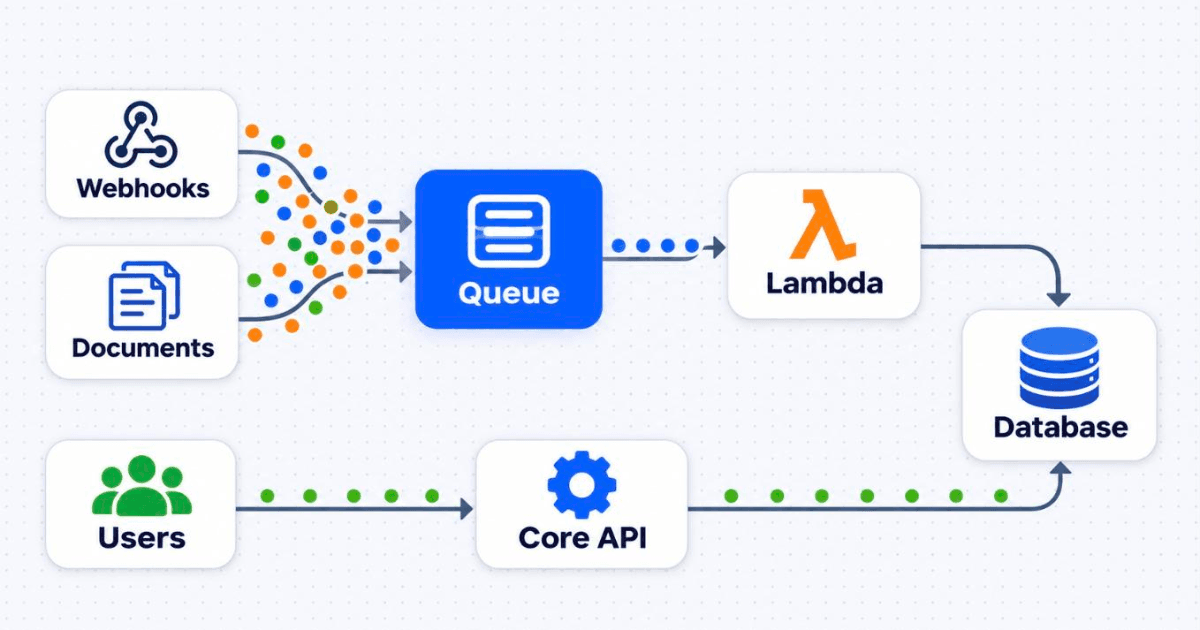
Split the job in two. Accepting a webhook takes a few milliseconds and should almost never fail. Processing it can take as long as it needs and can retry. So put API Gateway in front, drop the event into SQS, and let a Lambda function work through the queue at a pace your database can handle.
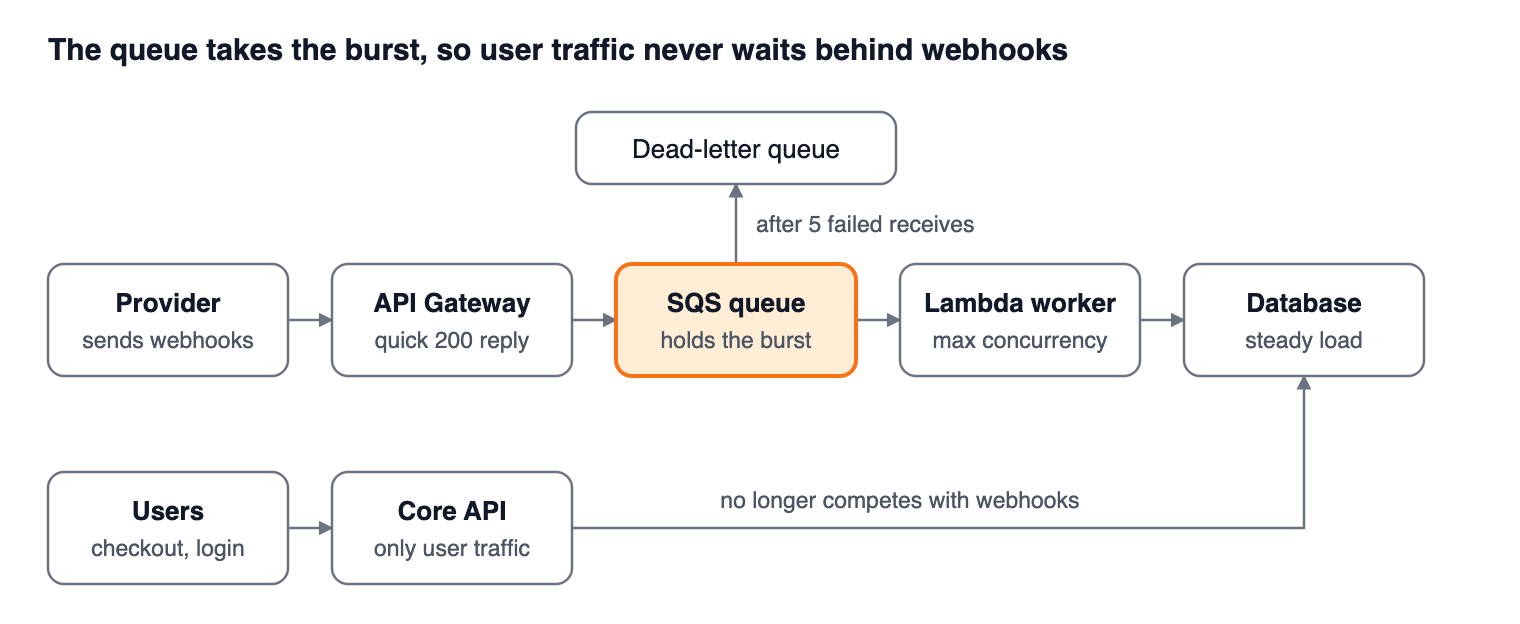
There are two ways to wire the front half. The choice comes down to where you want to verify the sender.
API Gateway straight to SQS. HTTP APIs have a built-in SQS integration and REST APIs can do it with a mapping template. No code runs in the request path, so there is nothing to crash and nothing to cold start. The catch is signature checks. A Lambda authorizer doesn't receive the request body, so you can't verify a signed body at the door. You have to carry the signature along with the message and check it in the consumer, which means forged requests can reach your queue.
API Gateway to a tiny Lambda, then SQS. The function verifies the signature, sends the message and returns 200. That is one more thing to deploy and a small cold start, but junk never enters the queue. For a public endpoint with a signed payload, this is the one I reach for first. I go direct when volume is very high and the endpoint is protected some other way, such as a provider's published IP ranges.
The settings that decide whether this works
The diagram is the easy part. Most production trouble with this pattern comes from the settings below.
Visibility timeout. AWS recommends six times your function timeout, plus any batching window. Set it too short and a second Lambda picks up a message the first is still working on.
Dead-letter queue. Send failures there after at least five receives. Fewer than that and a brief throttle can push perfectly good messages out of the queue.
Partial batch responses. Without them, one bad message sends its whole batch back for another round.
Maximum concurrency on the event source. This is your protection for the database. Without a cap, a backlog becomes a connection storm, and you have only moved the outage. If the function talks to RDS, put RDS Proxy in between as well.
Size. SQS now takes messages up to 1 MiB, up from 256 KiB. That covers nearly all webhooks, but check your provider if it sends large payloads.
Two more settings catch experienced teams out:
Retention. SQS keeps messages for 4 days by default and up to 14. On a standard queue, a message's expiry counts from when it first entered the source queue, even after it moves to the dead-letter queue. Give the dead-letter queue a longer retention than the source, or a long weekend can delete the evidence.
Account concurrency. Lambda functions in a Region share one concurrency pool, 1,000 by default. A worker draining a backlog can throttle unrelated functions unless it is capped.
Here is the event source and queue in Terraform, with a 2 minute function timeout:
resource "aws_sqs_queue" "webhooks" {
  name                       = "payment-webhooks"
  visibility_timeout_seconds = 720 # 6 x function timeout

  redrive_policy = jsonencode({
    deadLetterTargetArn = aws_sqs_queue.webhooks_dlq.arn
    maxReceiveCount     = 5
  })
}

resource "aws_lambda_event_source_mapping" "webhooks" {
  event_source_arn        = aws_sqs_queue.webhooks.arn
  function_name           = aws_lambda_function.webhook_worker.arn
  batch_size              = 10
  function_response_types = ["ReportBatchItemFailures"]

  scaling_config {
    maximum_concurrency = 20 # what your database can actually take
  }
}
Plan for duplicates and bad ordering
Standard SQS delivers at least once, and providers send duplicates of their own. Your worker has to be safe to run twice on the same event. The cleanest way I know is to record the event ID in the same database transaction as the business change:
def handler(event, context):
    failures = []
    for record in event["Records"]:
        try:
            payload = json.loads(record["body"])
            with conn.transaction():
                inserted = conn.execute(
                    "INSERT INTO processed_events (event_id) VALUES (%s) "
                    "ON CONFLICT DO NOTHING",
                    (payload["id"],),
                ).rowcount
                if inserted:
                    apply_event(conn, payload)
        except Exception:
            logger.exception("failed on %s", record["messageId"])
            failures.append({"itemIdentifier": record["messageId"]})
    return {"batchItemFailures": failures}
Order is the other trap. A "payment captured" event can overtake "order created". Compare timestamps before applying a change, or treat the webhook as a nudge and fetch the latest state from the provider. FIFO queues help, but they cost you throughput, so I wouldn't start there.
A queue also changes how failure looks. The API stops returning errors, the dashboards stay green, and customers see orders stuck on "processing" for 40 minutes. Put an alarm on ApproximateAgeOfOldestMessage and on dead-letter queue depth before go-live, and treat queue age as a service level with a named owner. Keep both alarms, because repeatedly failing messages on a standard queue can drop out of the age metric. Decide who replays the dead-letter queue, and replay at a limited rate so it doesn't cause a second outage. Agree with your product team that "paid" is no longer instant. That is a business decision, not an infrastructure detail.
Scenario 2: How should you process heavy documents without slowing your API?
Don't let the file touch your API at all. Have the client upload straight to S3, then process it in the background from an event.
I learned this on a claim processing platform at an earlier job, where speed was the whole selling point. We ran our own AI models, and the documents came in mixed: PAN cards, invoices, reports. Each type needed a different model, and a fraud detection model sat alongside them. Lambda functions handled the routing, sending each document down its own path.
The lasting lesson from that system was the value of keeping those paths separate. A bad release to the invoice model has no reason to touch PAN card checks. A flood of 80-page reports doesn't have to delay a one-page ID. Compare that with what happens when the same work lives inside one API service.
There, a user uploads a 50 MB scanned PDF. The file sits in the memory of a web worker. OCR pins the CPU. In Node that can block the event loop, and in Python it ties up a Gunicorn worker. If the pod runs out of memory, Kubernetes kills it, along with every unrelated request it was serving. You also run into hard limits if you try to solve this by putting the API behind API Gateway and Lambda: a 10 MB payload cap at the gateway, 6 MB for a synchronous Lambda call, and a 29 second default integration timeout.
The pattern that holds up
The client asks your API for an upload URL. The API creates a job record marked pending and returns a presigned S3 URL. This takes a few milliseconds.
The client uploads directly to S3. Your servers never see the bytes.
S3 sends an event to SQS.
A small Lambda works out the document type and puts the job on that type's own queue.
A processor for each type does the real work with its own memory, timeout and concurrency.
The result goes to your database, the job is marked done, and the client finds out by polling or by a push message.
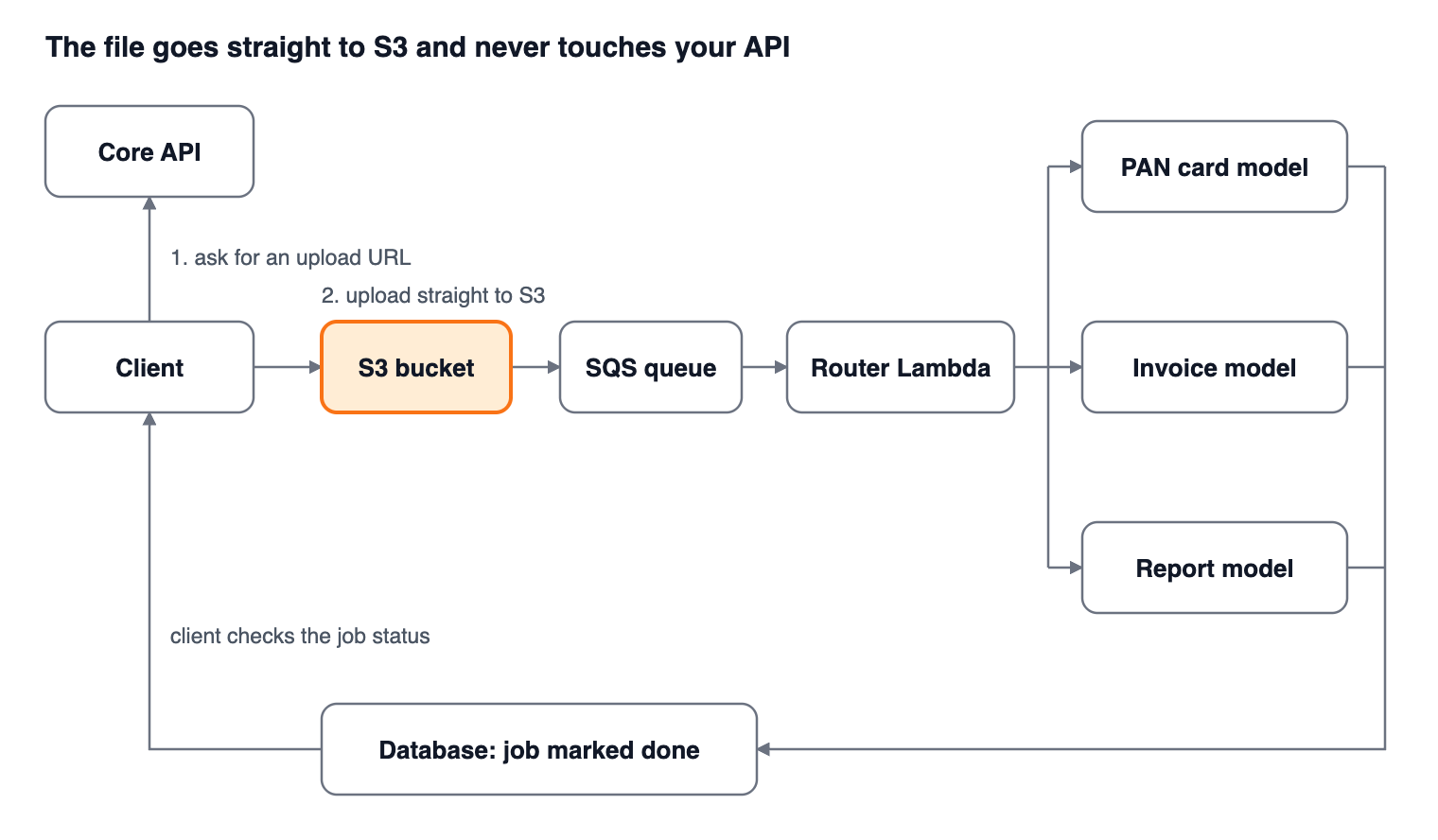
That means your API now serves two tiny requests per document instead of one enormous one, however large the file gets.
Details that are easy to miss
Use a presigned POST with a size limit if you can, because a plain presigned PUT will accept whatever someone sends. Pass the S3 key through your queues and never the document itself. With identity documents or medical records, that one habit keeps sensitive data out of queues, logs and dead-letter queues. Add KMS encryption and a lifecycle rule so raw uploads don't live forever.
There is a security benefit too. PDF and image parsers have a long history of bugs, and a malicious file now blows up inside a short-lived function with narrow permissions, away from your main application.
Know when Lambda stops being the answer. A function can run for 15 minutes with up to 10,240 MB of memory and the same again in /tmp, and it doesn't offer GPUs. For a 500-page scan or a model that needs a GPU, keep the same queue but hand the job to Fargate, AWS Batch or SageMaker. Nothing upstream has to change, and that flexibility is the best argument for this design.
Scenario 3: The "Export to Excel" button that hurts everyone else
Exports look harmless in a sprint plan. Then a customer with two million rows clicks the button on the last day of the month. The request runs for minutes, the worker holds all of it in memory, and a large query sits on your primary database while everyone else waits. Then the load balancer times out, the user clicks again, and now you are running it twice.
Treat a report like a document job. The API records the request and returns a job ID straight away. A message goes on a queue. A Lambda function reads from a replica in pages, writes to S3 in parts, and sends the user a time-limited download link.
Three rules keep this under control. Read from a replica, never the primary. Refuse a second identical export while the first is running, which also deals with impatient clicking. And in a multi-tenant product, stop one big customer from starving the others, either with per-tenant limits or with SQS fair queues. If some exports will run past 15 minutes, send those to a Fargate task from the start instead of trying to split them cleverly.
Scenario 4: Cron jobs living inside your API
A scheduler library inside the app feels fine with one instance. Scale to six pods and your nightly invoice run fires six times, unless someone remembered to add a lock. It also dies with the pod, competes with live traffic and takes its memory from the same limit.
Move the trigger out. EventBridge Scheduler calls a small Lambda, which lists the work and puts one message per customer on a queue. Workers go through those messages with the same retries and dead-letter queue as everything above. If customer 4,312 has bad data, the other customers still get their invoices, and you have one failed message to look at in the morning.
If you already run a cluster well, a CronJob is a perfectly good answer. What matters is getting the job out of the API process. Lambda is only the better choice when the job is short and rare and you would otherwise keep capacity around for it.
Scenario 5: Notifications and slow third parties
A customer places an order. The API saves it, then sends an email, then an SMS, then a WhatsApp message, then updates the CRM, all before responding. When the SMS vendor slows down, your checkout latency becomes that vendor's latency. A partner's outage has become your outage.
Save the order and publish one event. SNS or EventBridge passes it to a separate SQS queue for each consumer, and each queue gets its own Lambda. Now the SMS vendor can be down for an hour and its messages simply wait, while email and the CRM carry on.
The concurrency cap helps here too. If a vendor allows 50 calls at a time, a cap on the event source gets you close to that limit without writing a rate limiter. It is a blunt tool, but it is often enough.
This design has one gap. If your database commit succeeds and the publish fails, the event is gone. When that matters, as it does for money or compliance, write the event to an outbox table in the same transaction and have a separate process publish from there. It is more work, and it is the only version I would trust with payments.
Does moving to Lambda actually save money?
Sometimes. It saves real money on spiky work and can cost more on steady work, so run your own numbers before you promise your CFO anything.
The figures below are my own estimates using us-east-1 list prices: Lambda at $0.20 per million requests and $0.0000166667 per GB-second, with a free tier of 1 million requests and 400,000 GB-seconds a month, HTTP APIs at about $1 per million, and SQS at about $0.40 per million. Prices vary by region, so check yours.
Webhooks: 10 million events a month
Assume batches of 10, 200 ms per event, and 512 MB of memory.
Item | Working | Monthly cost (USD) |
|---|---|---|
API Gateway HTTP API | 10 million requests | About $10 |
SQS | Roughly 15 million sends, receives and deletes | About $6 |
Lambda compute | 1 million runs at 2 seconds and 0.5 GB, less free tier | About $10 |
Lambda requests | 1 million runs, inside free tier | $0 |
Total, before logs | About $26 |
That is small next to the cost of API capacity kept around for a burst, but the saving only appears if you actually shrink the API fleet after moving the work out. Plenty of teams add the new pipeline, keep every server, and end up paying a little more for a much calmer system. That can still be the right decision, but it is a reliability purchase and not a cost saving. Present it to leadership that way.
Documents: 200,000 a month
Now something heavier, at 30 seconds per document and 3 GB of memory. That comes to 18 million GB-seconds, or about 2.3 functions running at any moment on average. A 3 GB function gets about 1.7 vCPU, since Lambda gives one vCPU at 1,769 MB, so the average load is close to 4 vCPU and 7 GB.
Option | Monthly compute cost (USD) |
|---|---|
Lambda on x86 | About $293 |
Lambda on Arm | About $235 |
Fargate, 4 vCPU and 8 GB, running all month | About $144 |
So the container wins on paper by a wide margin, using Fargate's rate of $0.04048 per vCPU-hour and $0.004445 per GB-hour. But that row assumes perfectly level load all month, which no document workload has. If workers would sit idle half the time, the costs meet at about $288. So here is my rule of thumb: when a worker would be busy less than about half the time, Lambda tends to win. Above that, a container usually does, and Fargate Spot can widen the gap if your jobs tolerate being interrupted.
The larger point is this. The queue is the real fix. Lambda is just a convenient worker. Once work sits in SQS, you can pull from it with Lambda today and containers next year without your API noticing. Most of the performance gain comes from the decoupling, whichever compute you pick.
What the calculator leaves out
CloudWatch Logs. The Lambda free tier doesn't cover logs, and a chatty function can cost more in logging than in compute.
NAT gateways. A function in a VPC calling the internet pays NAT charges per GB. Use VPC endpoints for S3 and DynamoDB where you can.
Cold starts. Init time on standard runtimes is now billed too, so heavy imports cost you twice, in latency and in money.
Retries. A bug that fails every message runs up a bill while it does nothing useful.
Memory size. More memory also means more CPU, so a bigger function can finish fast enough to cost less. Test it with AWS Lambda Power Tuning instead of guessing.
When is serverless the wrong call?
Knowing where not to use serverless matters as much as knowing where to use it. I would keep work off Lambda in these cases:
Your core request path, if it has steady traffic. A container sitting at a healthy load is cheaper and has no cold starts. Provisioned concurrency fixes the cold starts, but then you are paying for idle capacity again.
Latency-sensitive endpoints. A user-facing call with a tight target and an unpredictable cold start is a bad match.
Jobs that run past 15 minutes or need GPUs. The limit is fixed. Don't build a clever chain of functions to get around it.
Anything that opens many database connections without a proxy. You will swap one outage for another.
Teams with no tracing. One request across a gateway, a queue and three functions is hard to debug without correlation IDs and distributed tracing. Sort that out first, or this will feel like a step backwards.
Lock-in comes up in every one of these conversations. For this kind of glue work, I don't treat it as a serious risk. Keep the business logic in a normal library with a thin Lambda handler on top, and moving it into a container later is a small job.
How to start without a big migration
Don't plan a serverless programme. Move one thing.
Look at your slowest and most resource-hungry endpoints, then run the four-question test from the start of this article on them.
Record your baseline: API p95 latency, peak database connections, instance count and monthly cost.
Move one job. Webhooks are usually the best first pick, because no user is waiting on the response and the rollback is just pointing the URL back.
Build the alarms and the dead-letter queue replay process before you cut over, not after.
Compare against your baseline after a full business cycle, including month end.
Reduce the API fleet if the numbers allow it. If you skip this step, you won't see the saving.
Prem Kumar (PK) is a DevOps Team Lead at a healthtech company, with more than eight years of experience in AWS, Kubernetes and Terraform.