AWS has given Amazon Elastic Container Service (ECS) a set of self-repair features aimed at one of the most tiring parts of running AI workloads: GPUs that fail quietly. The details were published on 9 October in a sponsored piece on The New Stack, written by AWS principal engineer Anirudh Aithal.
For teams running containers on AWS, the headline is simple. ECS can now find a sick machine, move your work off it and replace it, without anyone being paged. There is a catch hidden in the defaults, and it is about logs.
What ECS now does on its own
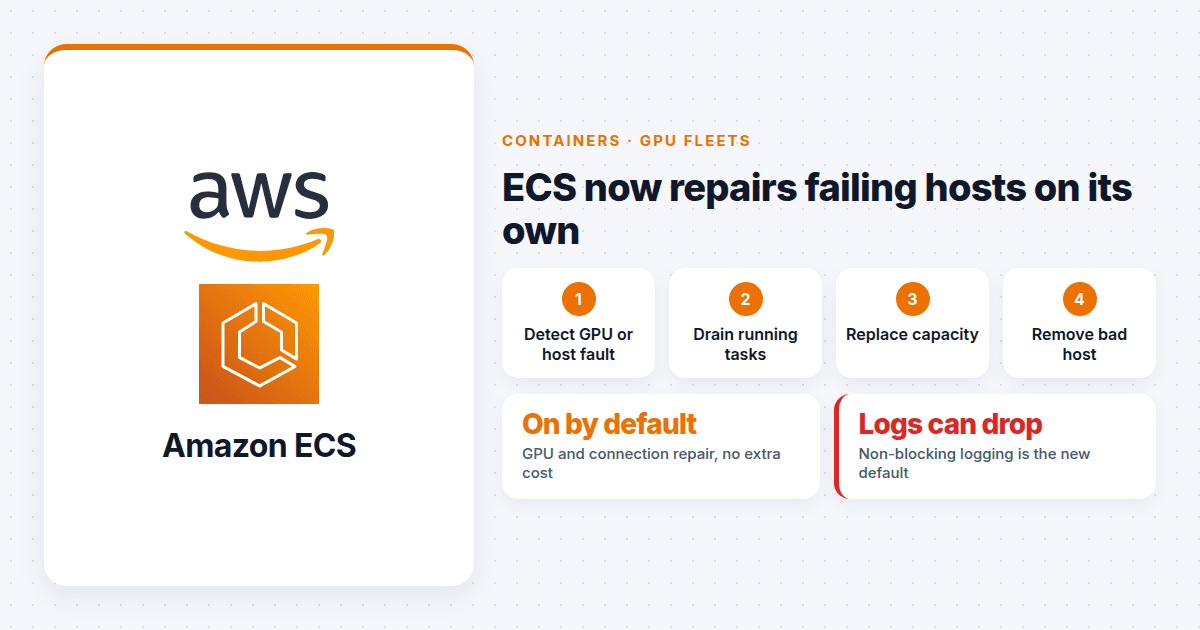
- GPU health checks. On ECS Managed Instances, ECS watches GPU health using NVIDIA's own monitoring tools and acts on hardware faults. These are faults the standard EC2 status checks often miss, which is why GPU hosts could sit broken while looking healthy.
- Lost connection repair. On Fargate and Managed Instances, if a host loses its connection to ECS for a sustained period, ECS treats it as impaired. Short blips that recover on their own do not trigger anything.
- A full repair loop. When a host is impaired, ECS drains its tasks, brings up replacement capacity and removes the bad host.
- Zone awareness. ECS steers new work away from an Availability Zone that shows signs of trouble and rebalances tasks when they become unevenly spread.
GPU repair and connection repair are switched on by default on supported platforms, at no extra charge.
The logging change
The same update makes non-blocking logging the default. Previously, if the logging service was slow, an application could stall while it waited to write logs. Now the application keeps running and logs that cannot be delivered are dropped.
For most services that is the right trade. A web app should not go down because a log pipeline is slow. But some teams depend on every line being kept: audit trails, billing records and anything a regulator might ask to see. For those, AWS says to switch back to blocking mode, at account level or in the task definition.
This is the part worth a leadership conversation. A default changed, and the effect only shows up during an incident, when people are least likely to notice missing logs.
Why this matters beyond AWS
GPU fleets fail differently from normal servers. A memory error on one card can slow or crash a training job while the host still answers every health check. Many teams have built their own scripts to spot these faults and recycle machines. AWS is now doing that work inside the platform.
That shifts the build or buy question for AI infrastructure. Every piece of home-grown repair automation is code someone has to own and test. If the platform now covers it, the honest move is to retire your version, not run both.
It also shifts responsibility. Automatic replacement means machines disappear without a person deciding. That is good for uptime, but only if your workloads can handle a host vanishing mid-task.
What to check this quarter
- List workloads that must keep every log line. Set those to blocking mode on purpose, and write down why.
- Find your own repair scripts. If you run custom GPU or host health checks on ECS, decide whether to keep them, retire them or point them at the new ECS signals.
- Test for interruption. Long training or batch jobs should checkpoint often enough that losing a host costs minutes, not days. AWS suggests using its Fault Injection Service to rehearse this.
- Spread across three zones. Zone steering only helps if there is somewhere to steer to. Plan enough spare capacity in the remaining zones to absorb the loss of one.
- If you run ECS on your own EC2 instances, these repairs are not fully automatic. Use the instance health events ECS now publishes to drive your own replacement.
The bigger lesson is not about ECS. Platforms keep changing defaults in ways that are sensible on average and wrong for someone. The teams that cope best are the ones who read release notes as part of the job, not after an incident.