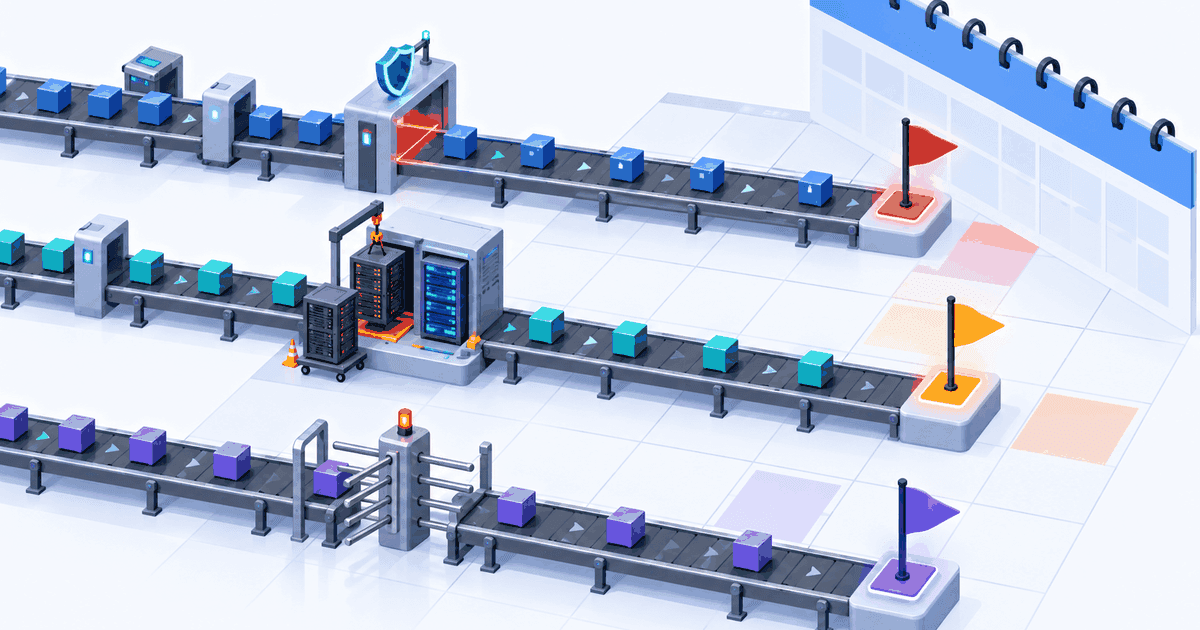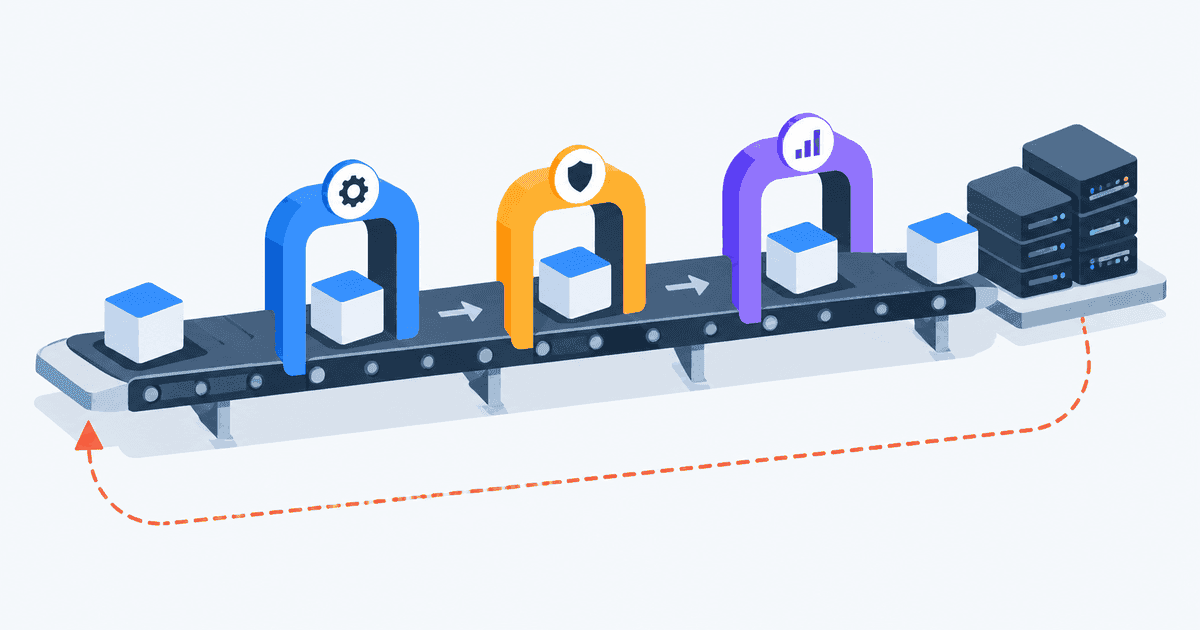
Somebody pushed a one-line config change at 4:40pm. It is now 5:25pm, the CI/CD pipeline is still on the integration test stage, and the author has gone home. Tomorrow morning three more commits will land on top of it, one of them will fail, and nobody will know which change actually broke things. That is not a tooling problem the YAML is fine, the runners are healthy it is a design problem in how the pipeline was assembled.
This article follows a single commit from git push to production and stops at every stage where real pipelines go wrong. Getting from commit to production reliably is less about the tool you picked than about a handful of decisions most teams make once, by accident. The focus is on judgement calls: what belongs in the pipeline, what should live somewhere else, and which defaults quietly cost you an hour a day.
The trigger is a policy decision, not a config line
The first thing that happens to your commit is that something decides whether to run at all. Most teams write this once, never revisit it, and end up either running the full pipeline on every README typo or skipping runs on changes that genuinely matter.
Two rules keep this sane. Run the full pipeline on anything that can reach a protected branch that means pull request events and pushes to main, not just one or the other. And scope path filters to build inputs, not to directories. A change under charts/ does not need the Go test suite; a change to go.mod needs everything, including the container build, even though no .go file moved.
Branch strategy shapes pipeline duration more than runner size
Trunk-based development with short-lived branches is the only strategy that makes a fast pipeline worth building. If branches live for a week, every merge is a big-bang integration and the pipeline's verdict arrives too late to be actionable you get a red build attributable to twelve commits at once.
Long-lived release branches are defensible in exactly two situations: you ship versioned software that customers install and you must patch old versions, or you have a regulatory gate that forces a code freeze window. If neither applies, main plus feature flags will serve you better than develop, release/* and a merge-back ritual. GitFlow was designed for a world of quarterly shrink-wrapped releases, and it costs real velocity when applied to a service that deploys daily.
One underused setting: mark PR-triggered jobs interruptible. GitLab has interruptible: true; GitHub Actions has concurrency with cancel-in-progress. A developer who pushes three times in ten minutes should not occupy three sets of runners.
Build once, and mean it
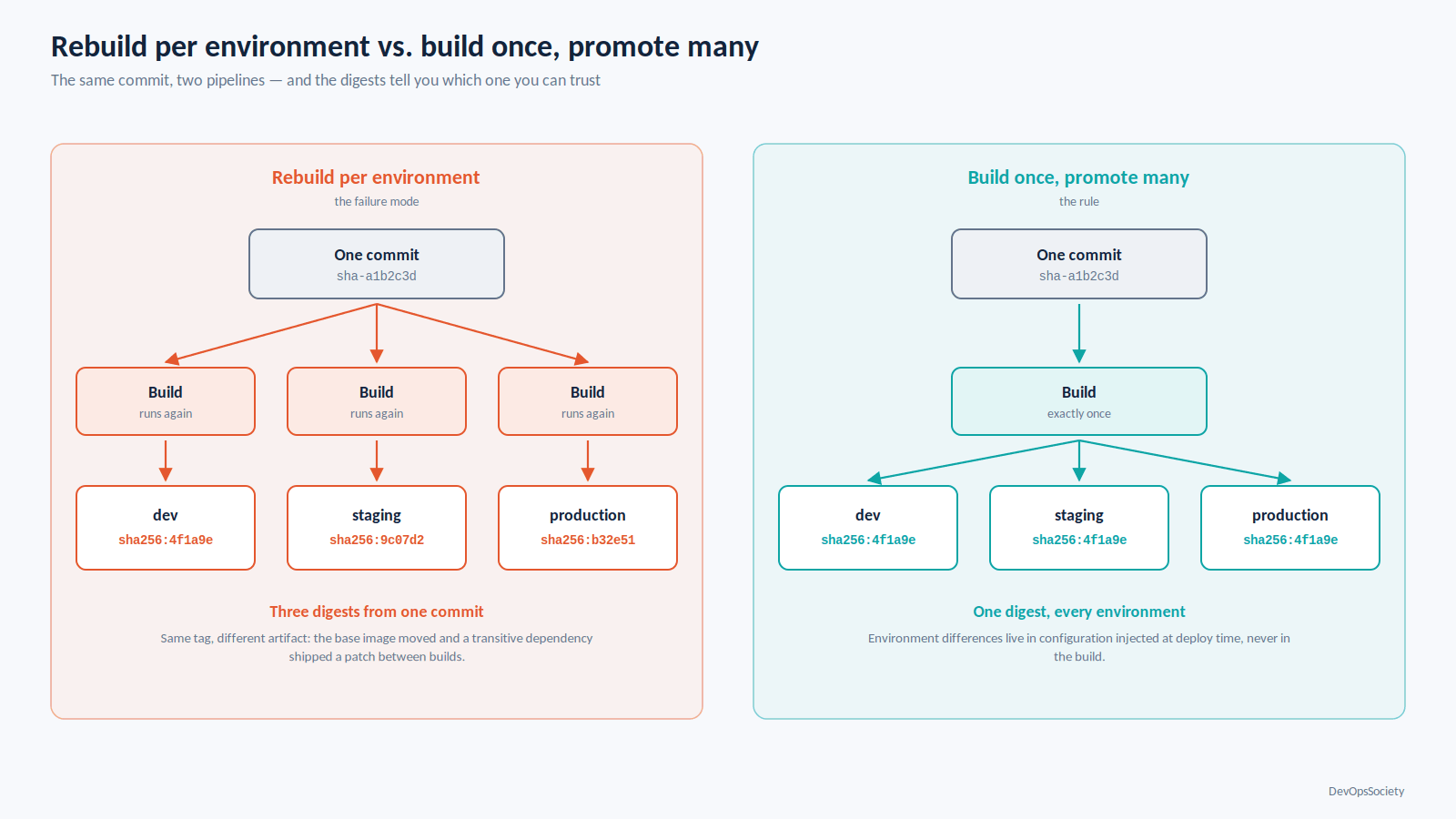
Here is the failure mode that causes more production surprises than any other single pipeline defect: the artifact gets rebuilt for each environment. The staging deploy builds an image, the production deploy builds another one from the same commit, and the two are not the same. Base image moved. A transitive dependency published a patch. A latest tag drifted. You tested one binary and shipped a different one.
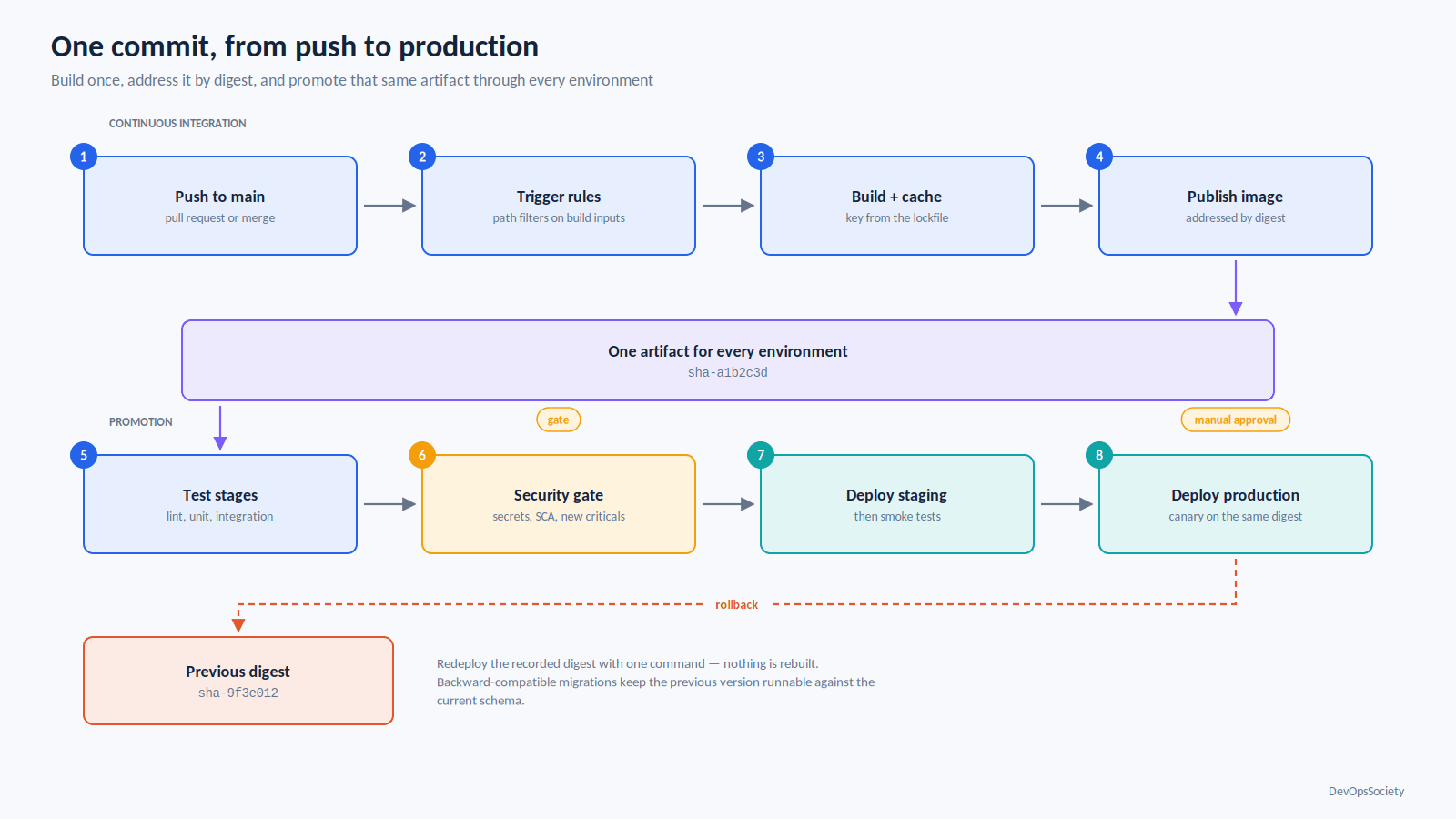
The rule is build once, promote many. The build stage produces exactly one artifact per commit, it is addressed by content digest rather than a mutable tag, andevery downstream stage including the production deploy months later refers to that digest. Environment differences live in configuration injected at deploy time, never in the build.
Version artifacts with something that survives a tag deletion. sha-<short-sha> as the canonical identity, with semantic version tags as additional pointers to the same digest, works well. Never deploy :latest, and never let a pipeline resolve a floating tag at deploy time.
Caching is where the twenty minutes hide
Dependency resolution is usually the largest fixed cost in a build. Cache it properly and a Node or Java build drops from minutes to seconds; cache it lazily and you get a cache that never hits, which is slower than no cache at all because you pay the upload cost every run.
The key must be derived from the lockfile, not the branch name. And restore keys need a sensible fallback chain so a single dependency bump degrades to a partial hit instead of a cold start.
# .github/workflows/build.yml
name: build
on:
  pull_request:
  push:
    branches: [main]

concurrency:
  group: build-${{ github.ref }}
  cancel-in-progress: ${{ github.event_name == 'pull_request' }}

jobs:
  build:
    runs-on: ubuntu-latest
    permissions:
      contents: read
      packages: write
      id-token: write        # required for OIDC and provenance attestation
      attestations: write
    steps:
      - uses: actions/checkout@v4
      - uses: actions/setup-node@v4
        with:
          node-version: 22
          cache: npm          # keys on package-lock.json, not on the branch
      - run: npm ci
      - run: npm run build
      - id: push
        uses: docker/build-push-action@v6
        with:
          push: true
          tags: ghcr.io/acme/api:sha-${{ github.sha }}
          # BuildKit layer cache, kept separate from the npm cache above
          cache-from: type=gha
          cache-to: type=gha,mode=max
      - uses: actions/attest-build-provenance@v4
        with:
          subject-name: ghcr.io/acme/api
          subject-digest: ${{ steps.push.outputs.digest }}
Two notes on the platform. GitHub Actions gives every repository 10 GB of Actions cache at no cost, and since November 2025 Pro, Team and Enterprise accounts can pay to go beyond that ceiling, with admin-configurable retention and eviction limits so "the cache keeps evicting itself" is now a budget question as well as a hygiene one. Separately, actions/cache v3 and older stopped working in February 2025 when the legacy cache service was shut down; if you inherited a pipeline that silently stopped caching around then, that is why.
On artifacts: actions/upload-artifact@v4 made uploads immutable. You can no longer append to an artifact from several jobs, and reusing a name fails unless you pass overwrite: true, which deletes and recreates rather than merging. Matrix jobs need unique artifact names. This trips up almost every v3-to-v4 migration.
The test pyramid inside a CI/CD pipeline
A pipeline is not a place to run every test you own. It is a place to run the tests whose feedback is worth the wait, in an order that fails fast on the cheap ones.
Stage | What it catches | Acceptable duration | When it fails |
|---|---|---|---|
Lint, format, type check | Syntax errors, obvious type mistakes, style drift | Under 60s | Block the PR; fix is trivial |
Unit tests | Logic errors in isolated functions | Under 3 min | Block the PR |
Build + container image | Broken dependency graph, missing files, bad Dockerfile | 2–5 min with warm cache | Block the PR |
SCA + secret scan | Vulnerable dependencies, credentials committed by accident | Under 2 min | Block on secrets and criticals; report the rest |
Integration tests (real DB, real queue) | Wiring, migrations, serialization, transaction boundaries | 5–10 min | Block the merge |
Contract tests | Breaking API changes against known consumers | Under 3 min | Block the merge |
Smoke tests post-deploy | Environment config, DNS, secrets, connectivity | Under 2 min | Auto-rollback |
Full end-to-end suite | Cross-service regressions | 15–40 min | Run after deploy to staging, not in the PR gate |
The headline number matters: total PR feedback should land in about ten minutes. Past roughly fifteen, engineers stop waiting and start context-switching, and the pipeline's verdict arrives after they have mentally moved on. The 40-minute pipeline does not get respected it gets bypassed with merge-queue overrides, "just this once" admin merges, and a culture where red main is normal.
Getting there usually means moving the end-to-end suite out of the PR gate and running it against staging after deploy, parallelising by test shard rather than throwing bigger runners at a serial suite, and being ruthless about integration tests that spin up six containers to assert one branch of logic.
Retries turn flaky tests into a slow leak
retry: 2 is the most dangerous line in CI configuration. It works the build goes green and that is precisely the problem. A test that passes on the second attempt is telling you something real about a race condition, a shared fixture, or a timeout tuned to a fast laptop. Retrying it converts a signal into noise, and after a few months nobody can tell you which of your tests are trustworthy.
A workable policy: quarantine over retry. When a test flakes, move it to a non-blocking suite immediately, file a ticket with an owner, and delete it if it is not fixed within a sprint. A quarantined test that nobody fixes was not protecting anything. Reserve automatic retries for genuine infrastructure faults runner eviction, registry timeouts which GitLab expresses precisely with retry: when: [runner_system_failure, stuck_or_timeout_failure] rather than a blanket count.
Security gates that catch things, and the ones that just slow you down
Put fast, high-signal checks inline and push slow, noisy ones out of band. Secret scanning and SCA on the dependency manifest belong in the PR gate they run in seconds and the findings are usually actionable. Full SAST across a large repository and container image scanning with every CVE database entry enabled do not; run those on a schedule against main, and gate only on newly introduced criticals with a fix available.
Fail builds on severity plus exploitability plus fixability, not severity alone. A critical CVE in a library you load but never call, with no patched version released, is a ticket not a reason to stop shipping.
Secrets end up in logs in ways masking does not cover
CI platforms mask exact secret values in output. They do not reliably mask transformations of those values. A secret that gets base64-encoded with a prefix appended, URL-escaped, embedded in a JSON blob, or printed as part of a structured object can come through in the clear GitHub's own guidance warns against using structured data as secrets for exactly this reason. Add set -x in a shell step, or a tool that helpfully echoes its full config on startup, and you have published a credential to anyone with read access to the run.
The durable fix is not better masking. It is short-lived credentials: OIDC federation from the CI provider to the cloud account, so the pipeline exchanges a workload identity token for a role session that expires in an hour and never exists as a stored secret. GitHub Actions does this with permissions: id-token: write plus aws-actions/configure-aws-credentials; GitLab does it with id_tokens. If you still have a long-lived AWS_SECRET_ACCESS_KEY in your CI variables, that is the highest-value thing on this list to fix.
Promotion: one artifact, three environments
Promotion is where the build-once discipline pays off or falls apart. The production job must not build anything. It takes the digest that staging validated and applies it to a different cluster with different config.
# .gitlab-ci.yml (promotion stages only)
variables:
  IMAGE: "$CI_REGISTRY_IMAGE@$IMAGE_DIGEST"   # digest, never a floating tag

deploy:staging:
  stage: staging
  environment:
    name: staging
    deployment_tier: staging
  id_tokens:
    AWS_ID_TOKEN:                 # short-lived OIDC token, no stored AWS keys
      aud: https://sts.amazonaws.com
  script:
    - ./deploy.sh staging "$IMAGE"
    - ./smoke.sh https://api.staging.example.com
  rules:
    - if: $CI_COMMIT_BRANCH == "main"

deploy:production:
  stage: production
  needs: ["deploy:staging"]       # same artifact, promoted — not rebuilt
  environment:
    name: production
    deployment_tier: production
    url: https://api.example.com
  when: manual                    # the only manual gate in the pipeline
  script:
    - ./deploy.sh production "$IMAGE" --strategy=canary
Keep environment config in the environment, not in branches. One pipeline definition, parameterised per target, beats a staging branch that drifts from main. And staging is only useful if it is shaped like production same managed database engine and version, same network boundaries, same IAM model. A staging environment running SQLite against a service that uses Postgres in production tests nothing that matters. The same reasoning that governs how you separate accounts, networks and blast radius for production workloads on AWS applies to your lower environments they need the same structure at smaller scale, not a simplified fiction.
Manual approval gates are worth exactly one per pipeline, at the production boundary, and only if the approver has information the pipeline does not. A human clicking "deploy" because the process says so, with no additional context, is a rubber stamp that adds latency and no safety.
Deployment strategy and the rollback you will actually reach for
Rolling updates are the sensible default for stateless services: Kubernetes gives them to you for free, and with correct readiness probes and a maxUnavailable of zero they are safe enough for most changes. The cost is that a bad version reaches all traffic within a few minutes and rollback means another rolling update.
Blue-green gets you instant cutover and instant rollback at the price of running two full environments and solving the database problem. Canary 5% of traffic, watch error rate and latency, promote or abort is the best fit for services with enough traffic that a 5% sample is statistically meaningful within minutes. Below a few hundred requests per minute, canary analysis is mostly superstition; you will not detect a regression in a 5% slice before the window closes. Use rolling updates and good alerting instead, and spend the effort you saved on making rollback fast.
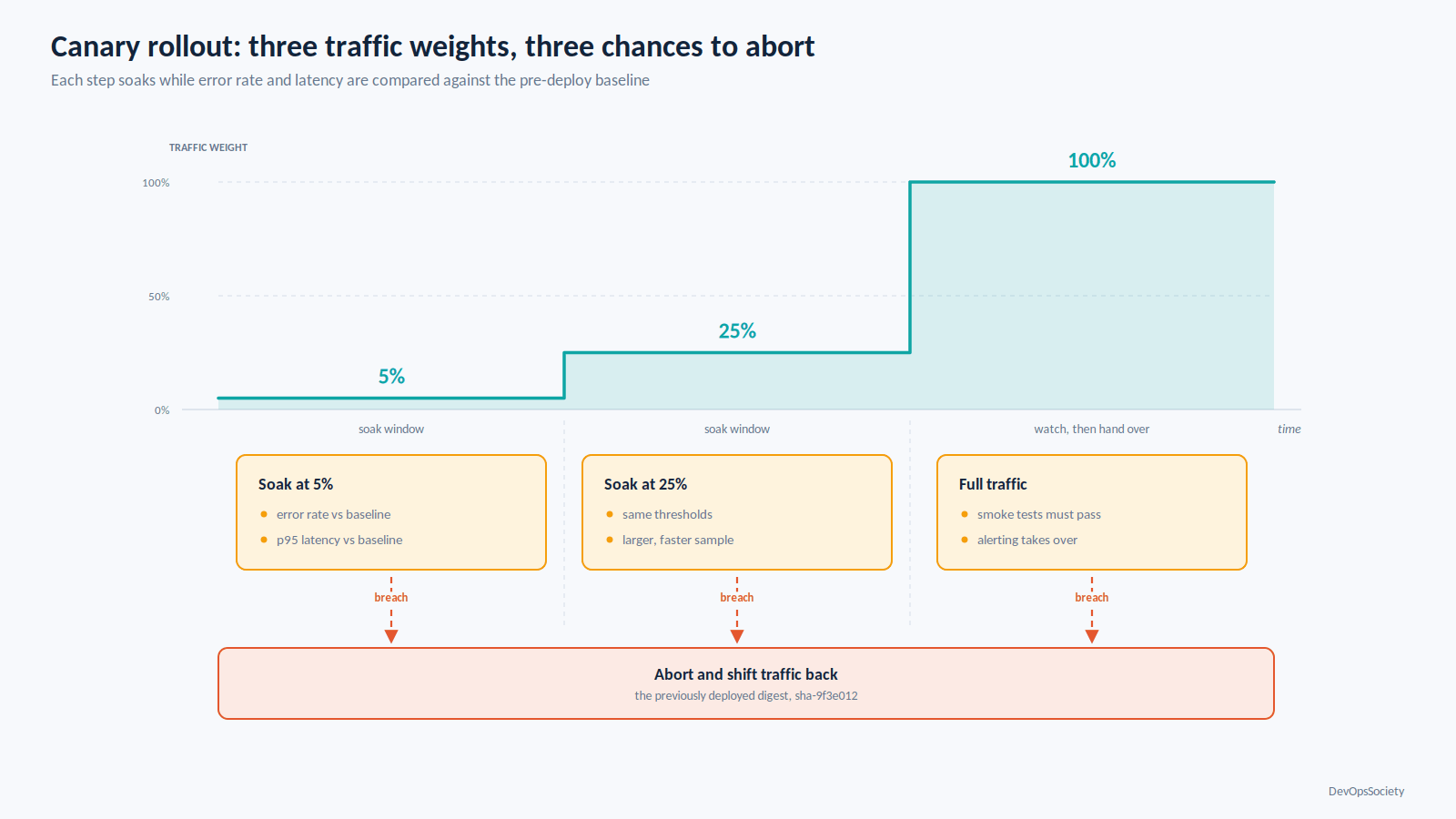
Rollback deserves more design attention than it usually gets. Three things make it reliable. Keep the previous artifact digest recorded and deployable by a single command not reconstructed from git history at 2am. Make database migrations backward-compatible by default, so the previous application version can run against the current schema; expand-and-contract, with the contract step shipped a release later, is the only pattern that survives a rollback. And decide in advance whether rollback is automatic. Automatic rollback on smoke-test failure or an error-rate breach within the first few minutes is almost always correct; automatic rollback on a vague latency wobble at hour three is how you get flapping deploys.
What does not belong in the pipeline
Opinions, briefly held with conviction.
Long-running load tests do not belong in the deploy path. They belong on a nightly schedule with a tracked trend, because a load test that gates a deploy either has thresholds so loose it catches nothing or so tight it blocks on noise.
Infrastructure provisioning does not belong in the application pipeline. A Terraform apply that creates a database has a different blast radius, a different approval model and a different rollback story than a container deploy. Keep them in separate pipelines with separate credentials.
Manual test sign-off does not belong anywhere. If a check is valuable, automate it; if it cannot be automated, it is a release note, not a gate.
Environment-specific build flags do not belong in the build. The moment NODE_ENV=staging changes what gets compiled, you no longer have one artifact.
Conversely, database migration execution does belong in the pipeline as its own stage, before the application deploy, with its own rollback plan. Running migrations by hand is how environments diverge.
Where to start if yours is slow today
Measure before you change anything. Pull the per-stage durations for the last hundred runs on main and sort by median. Most teams find one or two stages account for the majority of the time, and it is rarely the one they assumed.
Then, in order: fix the cache key so it hits; move the end-to-end suite out of the PR gate; quarantine every test that has flaked in the last month; replace stored cloud credentials with OIDC; and verify that your production deploy consumes a digest rather than rebuilding. That sequence takes a couple of focused days and usually cuts feedback time by more than half.
Once feedback is under ten minutes, the CI/CD pipeline starts doing what it was built for telling you, while you still care, whether the change you just made is safe to ship. More patterns for getting there are collected in our DevOps practice guides.