There is a Jenkins controller somewhere in your organisation that has 140 plugins installed, an uptime measured in months, and a .jenkins directory nobody has backed up since the person who built it left. Every quarter someone proposes migrating it, gets as far as counting the jobs, and quietly closes the ticket. Meanwhile a different team shipped a service last month on GitHub Actions without asking anyone, and the finance team has started asking why the Actions line item moved.
This is the real shape of the GitHub Actions vs GitLab CI vs Jenkins decision: not a greenfield evaluation, but a choice made under the weight of what already exists. This article gives you a straight recommendation for each concrete situation rather than a matrix of considerations, and it says plainly where Jenkins remains the correct engineering answer and where it has become debt that someone is defending for reasons that are not technical.
Start with the runner model, because everything else follows from it
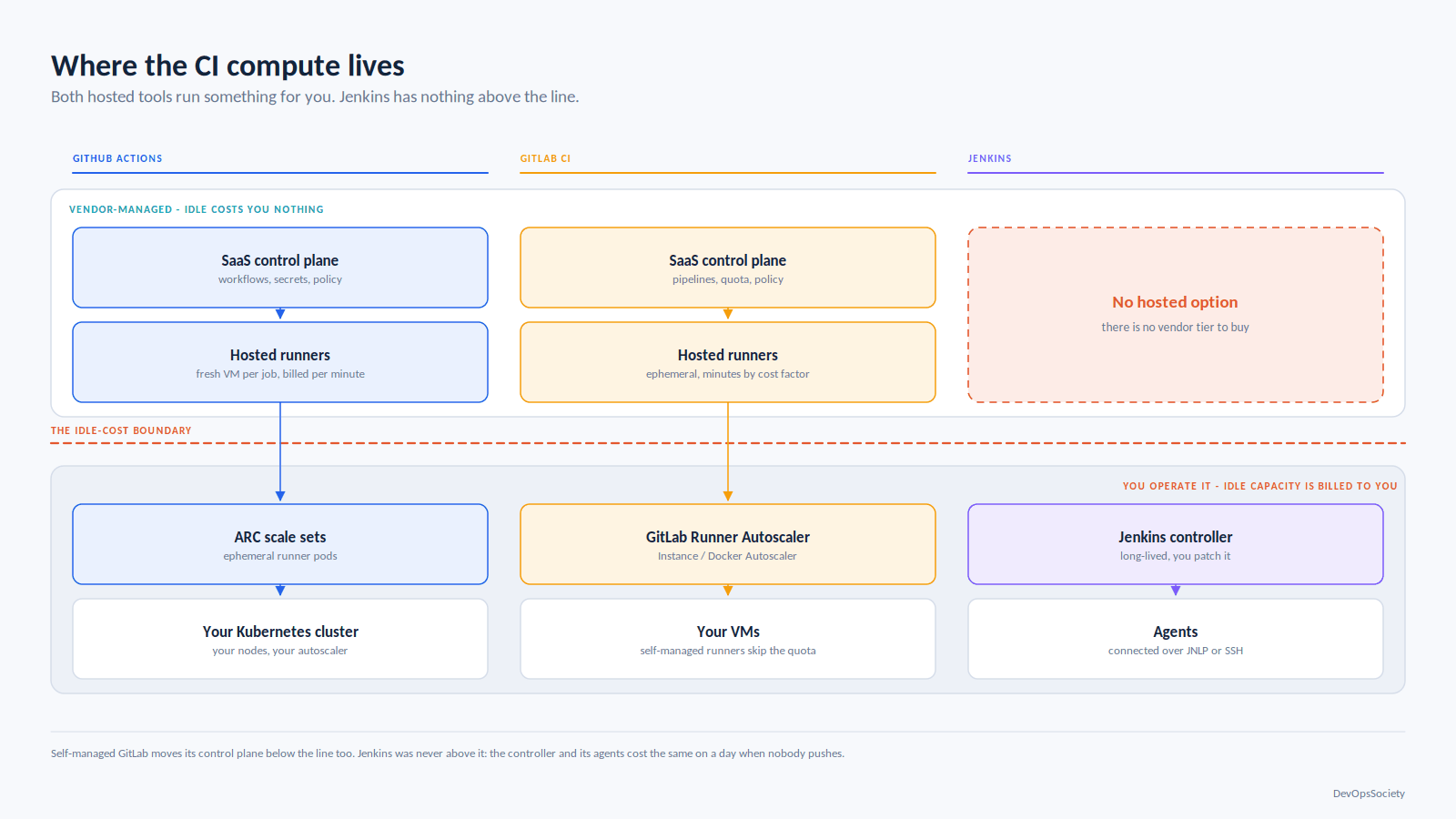
The single decision that determines how much of your life a CI system consumes is where the compute lives and who babysits it.
GitHub Actions and GitLab CI both default to ephemeral, vendor-managed runners: a fresh VM per job, destroyed afterwards, billed by the minute. Both also support self-hosted runners that you operate. Jenkins has no hosted option at all you run the controller, you run the agents, you patch both. That asymmetry is not a footnote, it is most of the comparison. A hosted-runner CI system has an operating cost close to zero when nobody is pushing. A Jenkins estate has a fixed cost that continues whether anyone commits or not, plus a human cost that is invisible until the person carrying it takes a holiday.
Self-hosted is where serious teams end up anyway, and the three diverge sharply in how painful that is. GitHub's answer is Actions Runner Controller, a Kubernetes operator scaling ephemeral runner pods against a scale set. It moves your CI capacity problem into your cluster autoscaler, which is a problem you already know how to reason about. GitLab's answer has been in flux: the Docker Machine executor that everyone built their autoscaling on is deprecated, replaced by the GitLab Runner Autoscaler with the Instance and Docker Autoscaler executors. If you are running GitLab Runner autoscaling today on Docker Machine, that migration is on your roadmap whether you have written it down or not. Jenkins autoscales agents through the Kubernetes plugin or EC2 plugin, both of which work, and both of which are plugins which is a sentence that will come up repeatedly.
The comparison that actually decides it
Axis | GitHub Actions | GitLab CI | Jenkins |
|---|---|---|---|
Hosting model | SaaS control plane; hosted runners or self-hosted. GitHub Enterprise Server for fully on-prem | SaaS or fully self-managed instance; hosted or self-managed runners | Self-hosted only; you own controller and agents |
Runner lifecycle | Ephemeral by default; ARC gives ephemeral pods self-hosted | Ephemeral by default; Instance/Docker Autoscaler executors replace Docker Machine | Long-lived agents unless you deliberately build ephemeral ones |
Config language | YAML, one file per workflow under | YAML, | Groovy DSL ( |
Reuse primitives | Composite actions, reusable workflows (up to ten levels of nesting), |
| Shared libraries (Groovy), versioned by Git ref if you bother |
OIDC to cloud | Native, first-class; short-lived token per job, subject claim carries repo/ref/environment | Native via | Plugin-provided; controller must expose a publicly reachable JWKS endpoint or host static metadata |
Cache and artifacts | Built-in cache with a free per-repo allocation, metered beyond it; artifacts retained 90 days by default | Built-in cache and artifacts with per-job | Archive artifacts on the controller by default, which becomes a disk problem; caching is a plugin decision |
Matrix and parallelism |
|
|
|
Monorepo support |
|
| Whatever you write in Groovy; |
Upgrade burden | None for SaaS; action versions are yours to pin | None for SaaS; self-managed upgrades are a real project | Monthly LTS line, Java baseline moves, plugin compatibility is your problem |
Governance and audit | Org policies, required workflows, environment approvals, OIDC subject claims as authorisation | Compliance frameworks, protected environments, push rules, approval rules | Role-strategy plugin plus whatever you assembled; audit trail depends on plugins |
Cost shape | Per-minute on hosted, sized runner multipliers; self-hosted compute is yours | Compute minutes multiplied by a per-runner-size cost factor; self-managed runners bypass the quota | Zero licence, all cost in infrastructure and the engineer maintaining it |
Read that table asking which axes you will actually hit. Most teams hit three: OIDC, monorepo filtering, and the bill.
Config language and reuse: YAML sprawl versus a Groovy monolith
All three start pleasantly and degrade differently.
GitHub Actions degrades into copy-paste. The unit of reuse is either a composite action (a bundle of steps, cheap, runs in the caller's job) or a reusable workflow (a whole job graph, called with uses: at job level). Reusable workflows can nest up to ten levels deep, which sounds generous until you learn that secrets are only passed to the workflow you directly call in a chain of A calling B calling C, C sees nothing unless B explicitly forwards it. Teams discover this at 11pm.
GitLab degrades into include chains that resolve in an order nobody can predict from one file. The primitives are better, though: extends does real key-level merging, include pulls templates from other projects, and CI/CD Components with the catalog give you versioned, input-typed building blocks that behave like a package registry rather than a copied file.
Here is the same idea a shared build job that a service pipeline specialises in both.
# GitHub Actions: .github/workflows/build.yml (reusable)
on:
  workflow_call:
    inputs:
      service: { required: true, type: string }
    secrets:
      registry_token: { required: true }   # must be passed explicitly; `inherit` only covers direct calls

jobs:
  build:
    runs-on: ubuntu-latest
    steps:
      - uses: actions/checkout@v4
      - run: make build SERVICE=${{ inputs.service }}
# GitLab CI: .gitlab-ci.yml
include:
  - project: platform/ci-templates
    ref: v3.2.1                 # pin the ref, or every downstream pipeline changes when someone edits main
    file: /templates/build.yml

build:checkout:
  extends: .build               # key-level merge, not string substitution
  variables:
    SERVICE: checkout
Jenkins degrades worst, and it does so silently. Shared libraries are genuinely powerful you can express logic that YAML cannot and that power is the trap. The library starts as three helper functions. Two years later it is 4,000 lines of Groovy, loaded with @Library('platform@master') from every pipeline in the company, with no tests and no versioning, so a single commit to it can break every build simultaneously. If you keep Jenkins, pin every consumer to a tag and treat the library as a released artifact with a changelog. Teams that do this are fine. Teams that use @master are one careless merge from a company-wide outage.
OIDC is where Jenkins loses on merit
Federating short-lived cloud credentials into CI is the most consequential security improvement available to most pipelines, and it is the axis where the gap between the hosted tools and Jenkins is widest.
GitHub Actions and GitLab CI both mint a signed JWT per job from a publicly reachable issuer, which you register as an IAM identity provider and scope with a trust policy. The subject claim carries structure repository, ref, environment on GitHub; project path, ref, and ref type on GitLab so you can write a trust policy that only lets the main branch of one repo assume the production deploy role. No long-lived access keys exist anywhere. Setting this up costs an afternoon, and it is the change that makes the rest of your security work in the pipeline worth doing.
Jenkins can do this, via the OIDC Provider plugin, and the mechanics are sound: the controller holds a keypair, signs build-scoped tokens, and serves the public key. The catch is structural. Your cloud provider must be able to fetch the JWKS and discovery documents, which means either exposing your Jenkins controller to the internet over HTTPS an unattractive proposition for a service with the plugin surface Jenkins has or hosting two static JSON files at an alternate issuer URI and keeping them in sync with key rotation. Both are fine. Neither is a default. The practical outcome is that the median Jenkins installation still authenticates to AWS with a static access key in a credentials binding, and the median GitHub Actions repository does not.
Trust policies hide a common failure: a policy matching repo:myorg/myrepo:* rather than a specific ref or environment lets any branch assume that role. Scope the subject claim narrowly and gate production behind environments with required reviewers.
Caching, artifacts, and the bill that moves
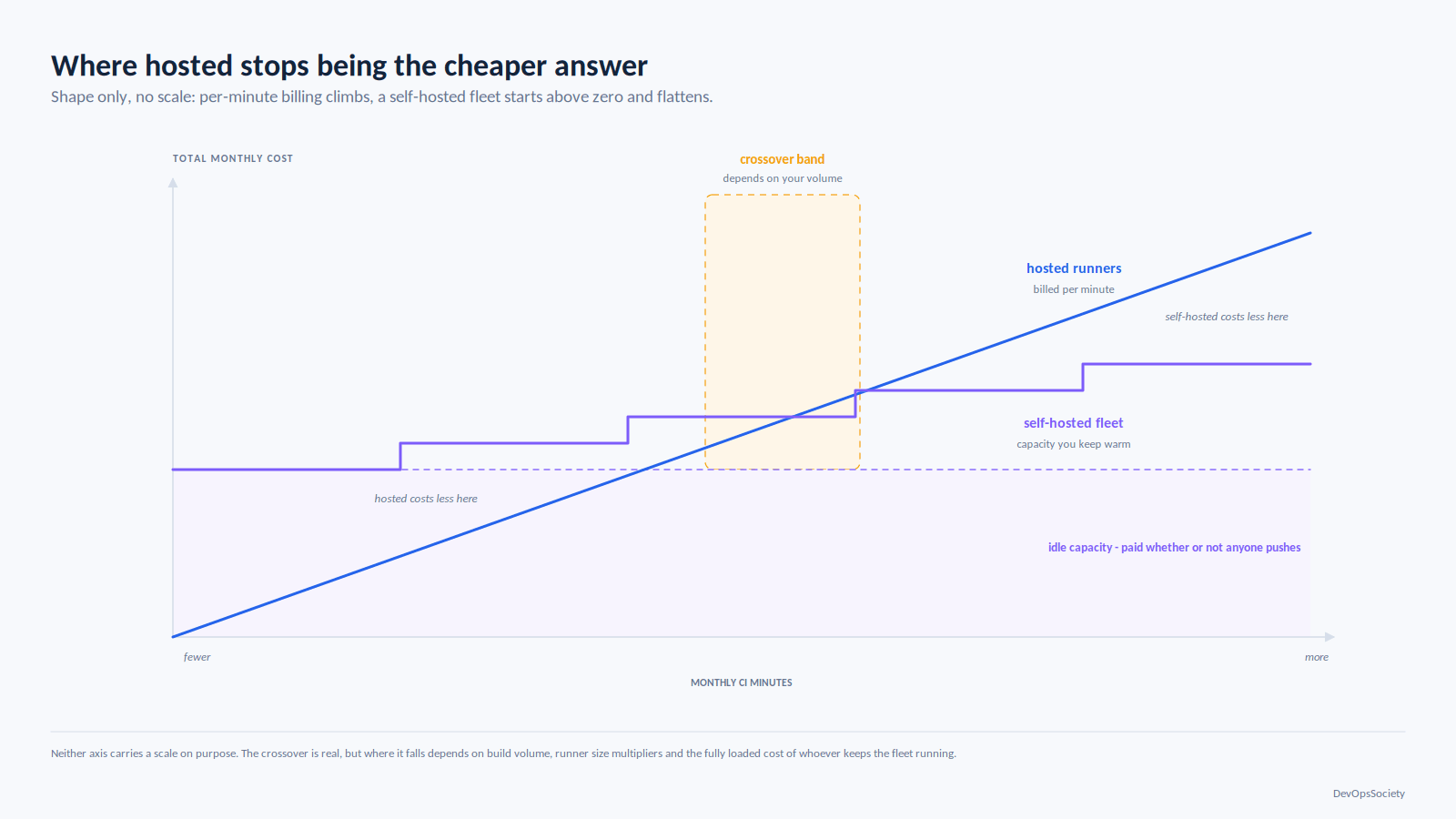
Hosted CI pricing is a per-minute rate multiplied by a runner size factor, and the second term is what surprises people.
On GitHub Actions the multiplier scales with the runner size you request, so switching a slow test job from a standard runner to a larger one to save wall-clock time multiplies your per-minute cost by more than the speedup usually returns. Public repositories are free on standard runners. GitHub reduced hosted runner rates at the start of 2026 and separately announced a small per-minute platform charge on self-hosted runner jobs, which drew enough objection that it was postponed rather than shipped worth watching if your cost model assumes self-hosted minutes are free of vendor charges.
GitLab makes the arithmetic explicit: job duration divided by 60, multiplied by a cost factor running from 1 on the smallest Linux x86 instance to roughly an order of magnitude more on the largest, with GPU and macOS instances carrying their own factors. Quotas accumulate at the top-level namespace and reset monthly. Self-managed runners consume no quota, which is the lever most GitLab customers eventually pull.
Cache is the other line that moves. GitHub gives each repository a free cache allocation and, since late 2025, meters storage beyond it with a configurable eviction limit and retention policy so a monorepo with a large dependency graph can now quietly accrue storage cost where it previously just evicted. GitLab's cache is the runner's problem: local by default, which means a cache hit depends on landing on the same runner, and genuinely distributed only if you configure an S3-compatible bucket. Teams debugging "why is our cache hit rate 30%" on GitLab are almost always missing that config.
Jenkins has no cache primitive. You either mount a persistent volume on long-lived agents, which is fast and destroys reproducibility, or you build caching yourself with a plugin and object storage. Watch the first failure mode: a test suite that passes only on agent-07 because of a stale artifact in a shared workspace is a miserable afternoon.
Monorepos, matrices, and where the ceilings are
GitLab wins the monorepo axis and it is not close. rules:changes combined with parent-child pipelines lets you generate a child pipeline per affected component, with a needs DAG that expresses real dependencies rather than stage ordering. GitHub Actions gives you paths filters at the workflow trigger level, which is coarser: you end up either with many small workflow files or with one workflow that runs and then decides internally to do nothing, burning a runner minute to discover it has no work. The common workaround a changes detection job feeding a matrix via fromJSON works, and it is a workaround.
The hard ceiling on GitHub Actions is 256 jobs per workflow run from a matrix, which large fan-out test sharding hits. GitLab's parallel keyword shards with CI_NODE_INDEX and CI_NODE_TOTAL without the same cliff, though runner concurrency binds first. Jenkins has no imposed limit and no help: parallelism is bounded entirely by how many agents you are willing to pay for, which is either freedom or a trap depending on whether anyone is watching the AWS bill.
The plugin ecosystem is Jenkins's best and worst feature
A plugin ecosystem in the low thousands means there is something for your obscure on-prem artifact repository, your 2011-vintage test reporter, and your bespoke deployment gate. Nothing else in this comparison can say that, and for some organisations it ends the discussion before it starts.
The cost is a dependency graph you do not control. Plugins declare a minimum Jenkins core version and depend on each other; upgrading one can require upgrading core, which can break a third that is no longer maintained. Jenkins core moves the LTS line ships roughly monthly, and the Java baseline has continued to advance, with Java 17 support dropped in the spring 2026 LTS in favour of Java 21 or newer. That is a real migration for anyone running an older JVM, and it is exactly the kind of change that turns "we should upgrade" into "we will upgrade next quarter" for the fourth consecutive quarter.
The controller nobody dares upgrade is not a joke, it is a predictable end state of unmanaged plugin drift. The way out is boring and it works: define the controller and its plugin set as code with the Configuration-as-Code plugin and a pinned plugin list baked into a container image, then upgrade by rolling a new image with a tested plugin set. If your Jenkins is a pet with a mutable plugin directory, you do not have a CI server, you have an artefact.
GitHub Actions vs GitLab CI vs Jenkins: straight answers by situation
Your code is on GitHub and you have no unusual compliance constraint: use GitHub Actions. The integration with pull requests, environments and OIDC is tighter than anything you will assemble, and the marginal cost of running a second CI system against the same repos is not worth whatever GitLab or Jenkins gives you.
Your code is on self-managed GitLab: use GitLab CI. Running Jenkins alongside a GitLab instance means operating two systems to do one job, and GitLab's monorepo and DAG support is better than what you will hand-roll.
You are a platform team serving many repos in a monorepo with heavy path-based filtering: GitLab CI, even if it means moving source hosting. Parent-child pipelines are the feature you will miss most elsewhere.
You have hard data-residency or air-gap requirements: GitLab self-managed or GitHub Enterprise Server. Both work air-gapped. Jenkins also works, and is the cheapest to license, which is not the same as the cheapest to run.
You are a small team shipping to one cloud and arguing about this: pick whichever one matches your Git host and stop. The difference between these tools is worth less than a month of deciding. Spend the time on your pipeline design from commit through to production instead, which determines far more of your delivery speed than the YAML dialect does.
When Jenkins is genuinely the right answer
Three situations. First, orchestration that is not really CI: hardware-in-the-loop testing, long-running batch jobs, build farms of heterogeneous physical machines and exotic OSes. Jenkins's agent model handles a room full of specific machines better than either hosted alternative. Second, deep integration with something old and important that has a Jenkins plugin and no API. Third, a scale of build volume where hosted per-minute pricing genuinely exceeds the fully loaded cost of self-hosting that crossover exists, it is real, and it arrives sooner than vendors like to admit.
When it is debt someone is defending
The tell is that the arguments are about sunk cost rather than capability. "We have 400 jobs" is a migration estimate, not a reason. "Only Dave understands the shared library" is an argument for migrating. If your Jenkins runs static cloud credentials, has plugins installed by hand, has no controller upgrade in over a year, and its jobs are ordinary build-test-deploy pipelines with nothing exotic in them, you are paying an engineer's partial salary to maintain a worse version of something you could get for free with your Git host. Being able to name that honestly is part of the platform and SRE judgement the role is supposed to bring.
Migration, realistically
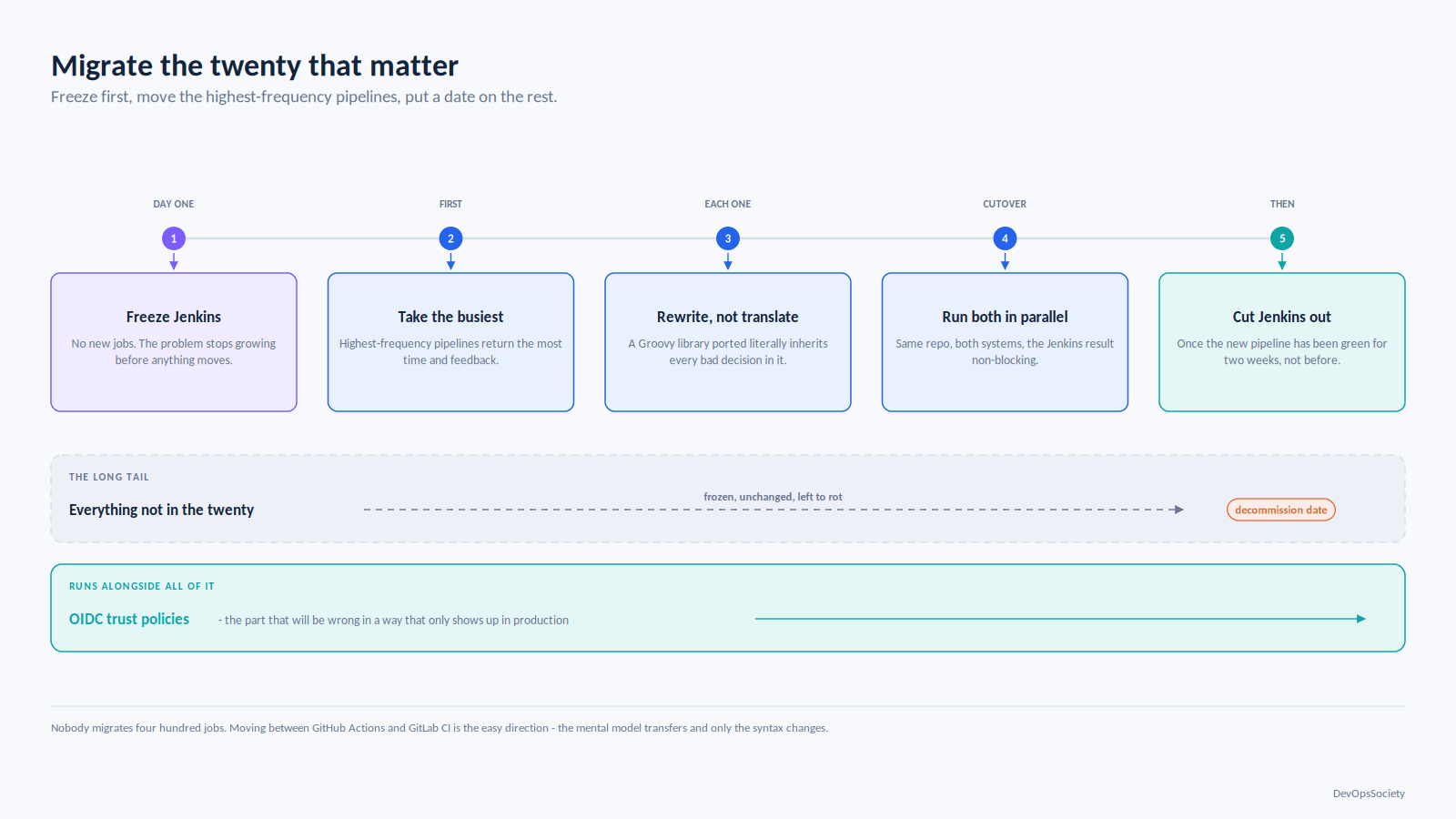
Nobody migrates 400 Jenkins jobs. They migrate the twenty that matter and let the rest rot with a decommission date on them.
The pattern that works: freeze Jenkins to new jobs on day one, so the problem stops growing. Move the highest-frequency pipelines first you get the most feedback and the most time back. Run both systems in parallel for the same repo during cutover, with Jenkins's result non-blocking, until the new pipeline has been green for two weeks. Rewrite rather than translate; a Groovy shared library converted literally into a composite action inherits every bad decision in it, and the Jenkins-to-anything converters produce output you will end up rewriting anyway.
Moving between GitHub Actions and GitLab CI in either direction is easier than anything involving Jenkins: the mental model transfers and only the syntax changes. Budget a week per non-trivial pipeline, and treat OIDC trust policies as a separate workstream they are the part that will be wrong in a way that only shows up in production.
What to do this week
Pick one pipeline and measure three numbers: the wall-clock time from push to deployable artifact, the cache hit rate, and the number of static long-lived credentials it holds. If that third number is above zero, fix it before you change anything else OIDC federation is available in all three tools and it is the highest-value change on this page regardless of which one you end up on.
Then check whether your CI compute bill is a line someone owns. On hosted runners it grows with headcount and nobody notices until it is large; on self-hosted it grows with idle capacity and nobody notices at all. More teams regret not instrumenting that than regret their choice of tool a pattern that repeats across the DevOps tooling stack.
One caveat before you commit. Everything above assumes your pipelines are ordinary. If you have a genuinely unusual constraint regulated artifact provenance, a hardware test rig, a build that takes nine hours that constraint outranks every general recommendation here, and you should design around it first and pick the tool that accommodates it second.