You've settled the first argument. Kubernetes it is. The second is quieter and more consequential: does AWS run the control plane, or do you? Amazon EKS is the obvious answer and usually the right one, but what burns teams isn't the part AWS runs. It's the length of the list that stays yours after you tick the box.
This guide settles where the managed boundary sits, how the compute models differ, the networking trap that catches most first clusters, what upgrades cost in calendar time, where the bill accumulates, and when EKS beats self-managed Kubernetes or loses to ECS.
What Amazon EKS manages, and what stays your problem
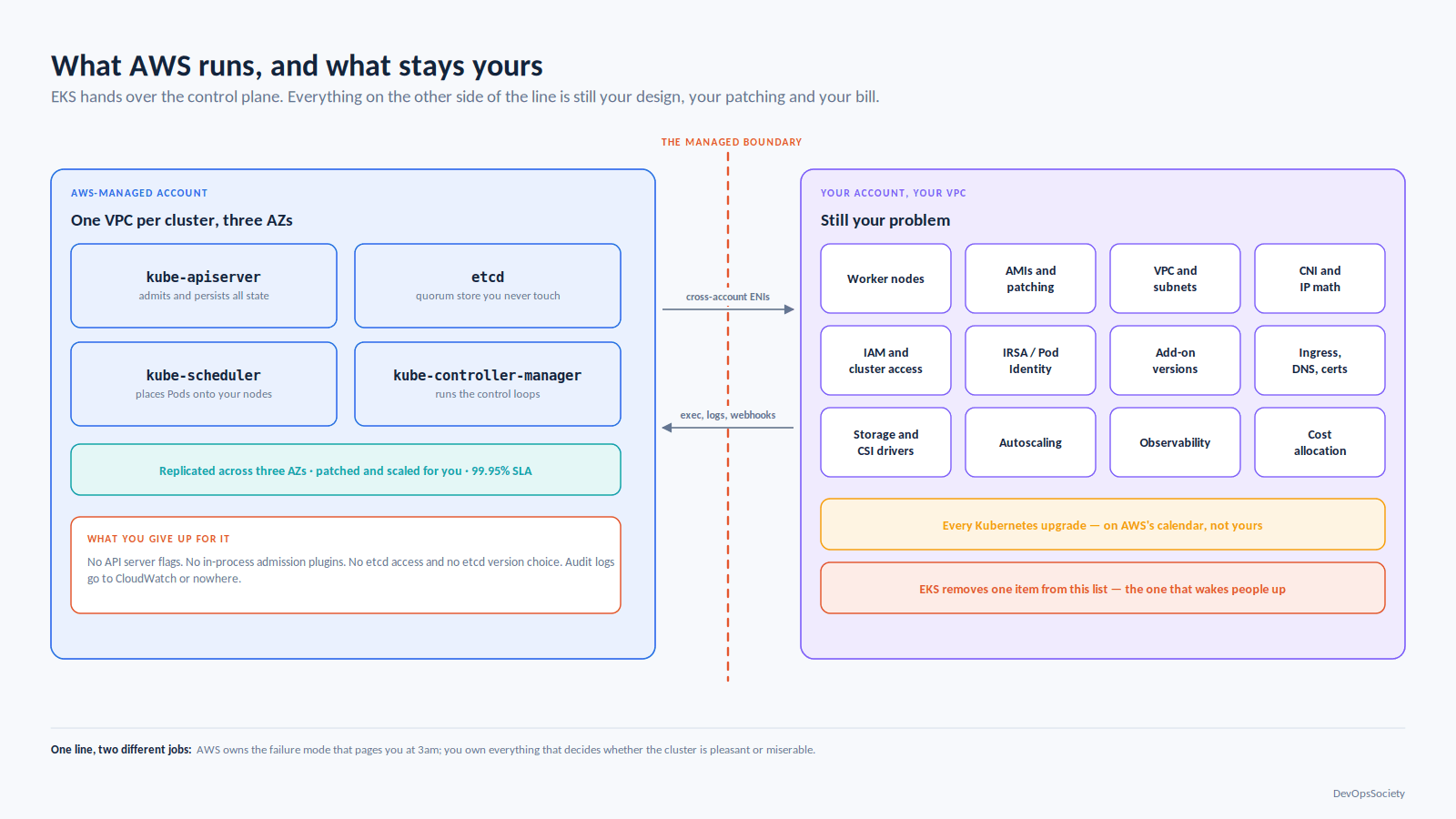
AWS runs the control plane: API server, etcd, scheduler and controller manager, replicated across three Availability Zones in an AWS-owned account, scaled and patched for you, behind a 99.95% SLA. You never take an etcd backup or fix a failed leader election at 3am. That's a real transfer of the work with the worst failure characteristics, and it's the whole value proposition.
Here's the other list the one that decides whether your cluster is pleasant or miserable:
Worker nodes: sizing, AMIs, OS patching, draining, scaling policy
VPC and subnet design, and the IP math that follows from it
CNI configuration, and every consequence of pods holding real VPC addresses
IAM: cluster access entries, node roles, workload identity, blast radius
Add-ons: which ones, which versions, who owns the config
Ingress, DNS, certificates, service mesh, storage classes, CSI drivers
Autoscaling, both pod-level and node-level
Observability, and the cost of shipping it
Every Kubernetes upgrade, on AWS's calendar rather than yours
Cost allocation, because Kubernetes makes your bill opaque by default
EKS removes one item from that list. It's the one that wakes people up, which is why it's worth paying for. But if you hoped "managed Kubernetes" meant "someone else runs Kubernetes," recalibrate now rather than in month four you still need a platform operating model, which makes the division of labour between SRE, platform and DevOps roles more important after adopting EKS, not less.
Control plane architecture and the managed boundary
The control plane lives in an AWS-managed VPC, one per cluster, reaching into yours through cross-account ENIs in subnets you nominate. Those ENIs carry exec and logs traffic to kubelets and calls to your admission webhooks, so an over-tightened security group breaks kubectl exec while everything else keeps running. You choose endpoint exposure public, private, or both, with CIDR restrictions. Private-only is right for anything regulated, and means your CI runners need a network path in; people discover that after building the cluster.
What you cannot do matters as much. No API server flags, no in-process admission plugins, no etcd access, no etcd version choice. Audit logs go to CloudWatch or nowhere. If you need --enable-admission-plugins, you need a webhook-based policy engine instead, which puts a synchronous dependency back in your write path. Keep the component-by-component picture of how a control plane hands work off in mind, because on EKS you debug that chain with half of it invisible. Amazon EKS scales the control plane automatically; provisioned tiers now exist to buy headroom explicitly, an admission that autoscaling has a reaction time.
Compute: four ways to get nodes
Managed node groups
EKS provisions an Auto Scaling group with EKS-optimized AMIs and handles cordon-and-drain during version upgrades, respecting PodDisruptionBudgets. The upgrade orchestration is the real feature: one API call, versus a launch template bump plus your own replacement logic.
Self-managed nodes
Your ASG, your AMI, your bootstrap script justified by a custom kernel, an unsupported OS or specialised drivers. The honest test: if you can't name the flag or driver forcing it, take a managed node group.
Fargate
One pod per micro-VM, no nodes, billed on requested vCPU and memory from the start of the image pull until the pod terminates. Best isolation story on EKS, most constrained runtime. Read its constraint list before you commit, not during: no DaemonSets, no privileged containers, no hostNetwork or hostPort, no GPUs, no Arm, no Windows, no EBS (EFS only, static), no Fargate Spot, private subnets only, no IMDS, no custom CNI, no node access. EKS Pod Identity doesn't work there either its agent is a DaemonSet so Fargate workloads still need IRSA.
The DaemonSet restriction is the one that hurts: log shipper, security agent and metrics daemon all become sidecars, multiplying their cost by pod count. Teams find out after moving the third service.
Karpenter and EKS Auto Mode
Karpenter watches for unschedulable pods and launches instances that fit, picking from a wide instance set rather than fixed node groups. It reached a stable v1 API in 2024 (karpenter.sh/v1, karpenter.k8s.aws/v1) and is now the default for node autoscaling on EKS. Consolidation replacing underutilised nodes with cheaper ones is where the savings come from, and where surprise pod churn comes from if you haven't written PDBs.
EKS Auto Mode is AWS running Karpenter for you, plus managed compute, storage, networking and load balancing, on immutable Bottlerocket AMIs with a 21-day maximum node lifetime and no SSH or SSM. You pay a per-instance management fee on top of EC2, and you give up node access, custom AMIs and privileged DaemonSets.
Option | Control you keep | Ops burden | Pick it when |
|---|---|---|---|
Managed node groups | Instance types, AMI family, scaling policy, user data | Medium - you own capacity planning and node health | You want predictable capacity and standard nodes; the default for most teams |
Self-managed nodes | Everything, including AMI and bootstrap | High - patching, rolling upgrades, drain logic are yours | A specific kernel, driver or OS requirement forces it, and you can name it |
Fargate | Pod specs only | Low - no nodes at all | Bursty, stateless or isolation-sensitive workloads, and the constraint list doesn't hit you |
Karpenter | Instance families, capacity type, disruption policy, limits | Medium - you own NodePool design and PDBs | Mixed or spiky demand, heavy Spot use, bin-packing needs an owner |
EKS Auto Mode | Workload specs and NodePool shape | Lowest of the EC2 options | No platform team, standard workloads, node access genuinely unnecessary |
A NodePool most teams could ship as-is:
apiVersion: karpenter.sh/v1
kind: NodePool
metadata:
  name: general
spec:
  template:
    spec:
      nodeClassRef:
        group: karpenter.k8s.aws
        kind: EC2NodeClass
        name: default
      requirements:
        - key: kubernetes.io/arch
          operator: In
          values: ["amd64", "arm64"]     # let Graviton win on price when the image supports it
        - key: karpenter.sh/capacity-type
          operator: In
          values: ["spot", "on-demand"]  # falls back to on-demand when Spot capacity is unavailable
        - key: karpenter.k8s.aws/instance-generation
          operator: Gt
          values: ["5"]                  # exclude older families with worse price/performance
  disruption:
    consolidationPolicy: WhenEmptyOrUnderutilized
    consolidateAfter: 1m
  limits:
    cpu: "1000"                          # hard ceiling so a runaway HPA cannot buy the region
Networking: the VPC CNI and the /24 that ran out
The Amazon VPC CNI gives every pod a real, routable VPC address. Pods reach RDS, peered VPCs and on-prem with no overlay, security groups apply at pod level, and Flow Logs show pod traffic. It's the best thing about EKS networking and the source of its worst failure mode.
In default secondary-IP mode, pod capacity per node is (ENIs × (IPs per ENI − 1)) + 2 an m5.large gets three ENIs at ten addresses each, so 29 pods. The CNI also keeps a warm pool attached to each node, so a node consumes more subnet addresses than it has running pods.
Now the arithmetic that bites. A /24 has 251 usable addresses after AWS's five reservations, and ten m5.large nodes with full warm pools claim most of that before you deploy anything interesting. The symptom is pods stuck in ContainerCreating with failed to assign an IP address to container, and there's no config fix you cannot resize a subnet. You add subnets or rebuild the VPC. Teams hit this in staging, patch around it, then hit it again in production.
Three ways out, in rough order of how often they're right:
Prefix delegation. Set ENABLE_PREFIX_DELEGATION=true and each ENI slot gets a /28 sixteen contiguous addresses instead of one. Density rises sharply (EKS caps the computed max-pods figure, commonly 110 on smaller instances and 250 on larger), and attaching a prefix takes about a second against ten for a new ENI. Needs Nitro instances and VPC CNI 1.9.0+. The catch is contiguity: a subnet fragmented by scattered secondary IPs fails with InsufficientCidrBlocks while still reporting free addresses. Use a fresh subnet with a CIDR reservation.
# Prefix delegation, with a conservative warm pool so nodes don't hoard /28s
aws eks update-addon --cluster-name prod --addon-name vpc-cni \
  --configuration-values '{"env":{"ENABLE_PREFIX_DELEGATION":"true","WARM_PREFIX_TARGET":"1"}}' \
  --resolve-conflicts OVERWRITE
Custom networking with a secondary CIDR. Attach 100.64.0.0/10 to the VPC and place pod ENIs there via ENIConfig. Nodes keep routable addresses, pods get plentiful non-routable ones. Costs one ENI's worth of pod capacity per node, and the config is fiddly.
IPv6. Removes the problem structurally and is the clean answer for greenfield, if every dependency in the path can cope which rules it out for most brownfield estates.
Size address space before the first eksctl create cluster. It's expensive to reverse, in the same category as the account and network boundaries covered in the Well-Architected treatment of foundational AWS design.
Identity: IRSA and EKS Pod Identity
IRSA projects a signed service account token into the pod; the SDK exchanges it with STS via AssumeRoleWithWebIdentity against a per-cluster OIDC provider. It works everywhere including Fargate and off-EKS clusters and has been the standard for years.
Its limits are structural. Each cluster needs its own IAM OIDC provider, capped at 100 per account. Each role's trust policy names a specific cluster issuer, so reusing a role across clusters means editing that policy every time, and a 2048-byte trust policy holds roughly four such conditions. Every pod start hits STS, which throttles at scale.
EKS Pod Identity replaces that with an association mapping a namespace and service account to a role through the EKS API, with a node-local agent DaemonSet serving credentials. The role trusts pods.eks.amazonaws.com once and works for every cluster; session tags let one role serve many service accounts via ABAC. No OIDC provider, no per-pod STS call.
AWS recommends Pod Identity wherever it works, and it doesn't work on Fargate, Windows nodes, EKS Anywhere, Outposts or self-managed clusters; cross-account goes through target-role chaining. The rule: Pod Identity for new EC2-backed workloads, IRSA for Fargate and anything that must run identically off EKS, and no migration project for IRSA roles that already work.
Add-ons and the drift you won't notice
EKS ships CoreDNS, kube-proxy and the VPC CNI, and offers managed add-ons CSI drivers, the Pod Identity Agent, observability agents, third-party software version-tested against cluster releases. Take them: add-on compatibility during upgrades is otherwise your research project.
The failure mode is quiet. Add-on config uses server-side apply, so fields AWS manages stay AWS's and fields it doesn't keep your edits. Someone bumps a limit on the aws-node DaemonSet by hand, it survives, nobody writes it down. Months later an update with --resolve-conflicts OVERWRITE erases it, or PRESERVE blocks a needed change either way the cluster no longer matches your Terraform. Put add-on settings in configurationValues in IaC and upstream any manual edit the same week.
Upgrades and the version treadmill
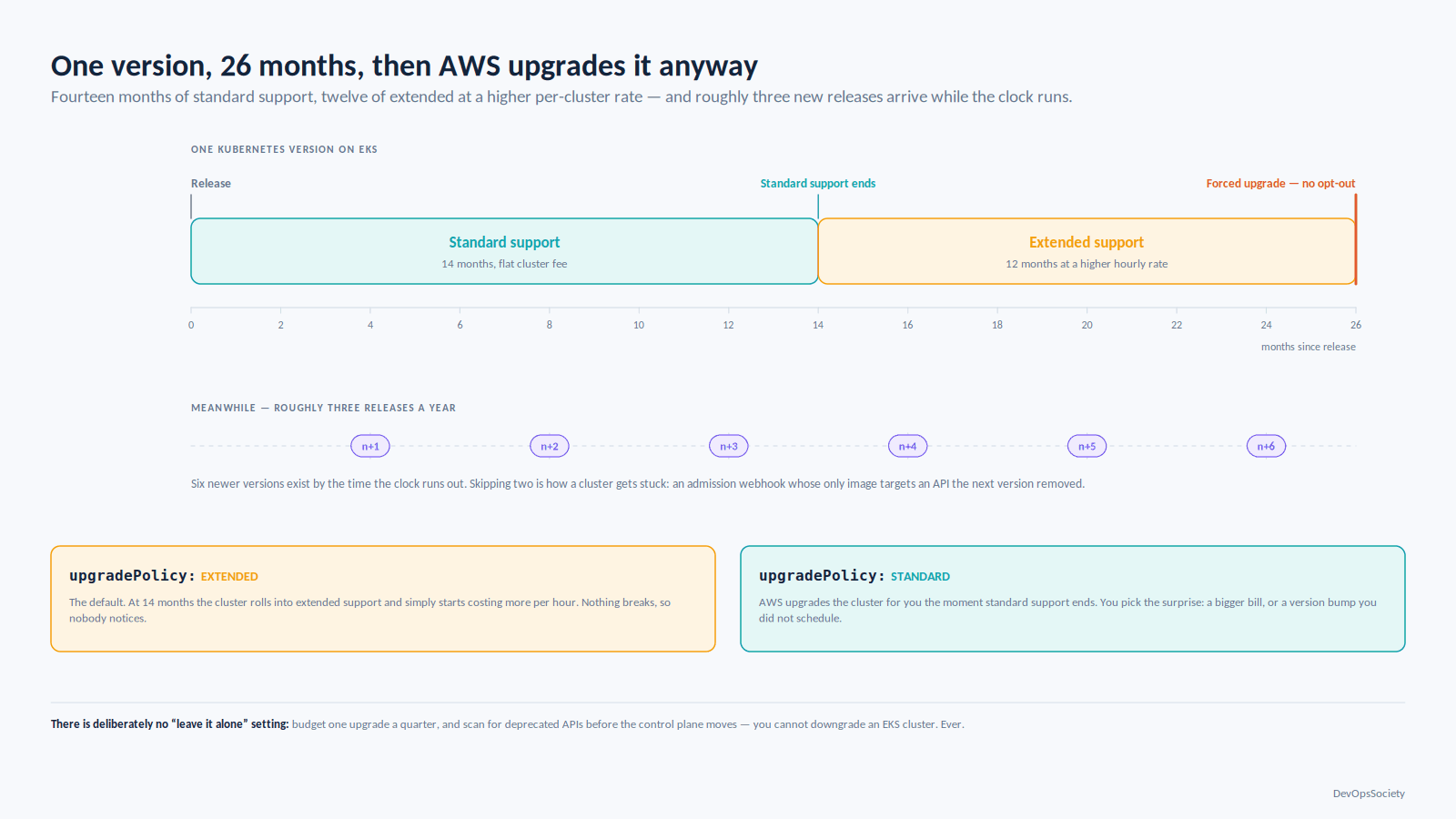
Every Kubernetes version gets 14 months of standard support on EKS, then 12 months of extended support at a higher per-cluster hourly rate 26 months maximum. Kubernetes ships roughly three releases a year, so a cluster nobody touches falls off the end while you're busy elsewhere.
The cluster's upgradePolicy decides what happens at that boundary. EXTENDED, the default, rolls into extended support and starts costing more; STANDARD has AWS upgrade the cluster automatically when standard support ends. At the end of extended support AWS upgrades it regardless. There is deliberately no "leave it alone" setting.
An upgrade is four things in order and only the first is a button: control plane, add-ons, nodes, then your manifests. The last hurts. Run a deprecated-API scankubectl checks or pluto over manifests and Helm charts before the control plane moves, because you cannot downgrade an EKS cluster. Ever.
The stuck-cluster failure mode is predictable: a team skips two versions, finds an admission webhook whose only image targets a removed API, and now has to upgrade through versions it can't run. Budget one upgrade a quarter. Clusters upgraded often are boring; clusters that aren't become projects.
Where the money actually goes
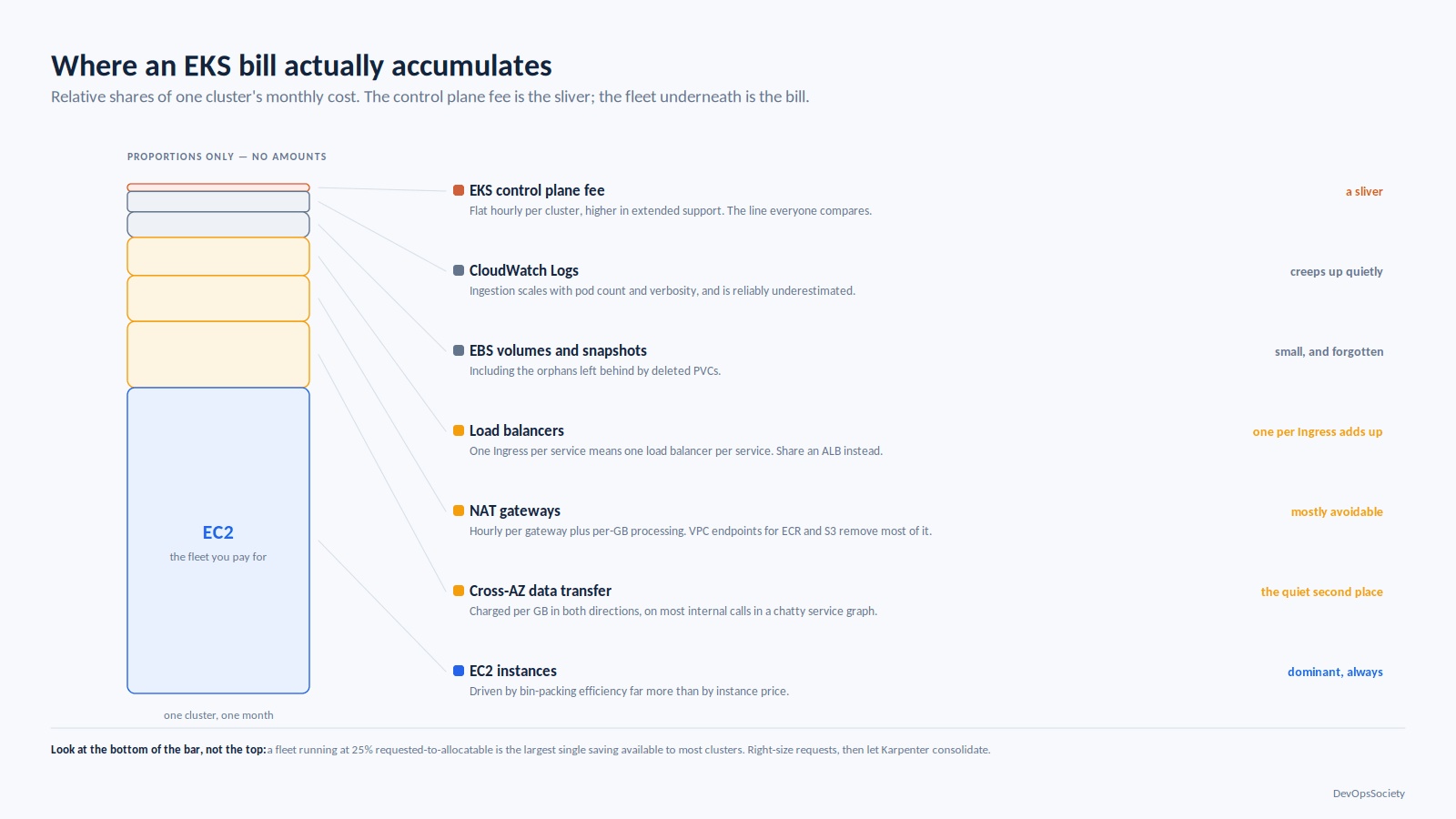
Amazon EKS charges a flat hourly fee per cluster, higher in extended support. That's the line everyone looks at and almost never the problem. Nodes are. In descending order:
EC2 instances, driven by bin-packing efficiency more than instance price. A fleet at 25% requested-to-allocatable is the largest single saving available to most clusters. Right-size requests, then let Karpenter consolidate.
Cross-AZ data transfer, charged per GB in both directions. Kubernetes spreads pods across AZs and Services load-balance without regard to topology, so a chatty service graph pays this on most internal calls. Set
spec.trafficDistributionPreferClosewas renamedPreferSameZonein Kubernetes 1.34, which also addedPreferSameNode.NAT gateways: hourly per gateway plus per-GB processing. Private clusters pulling from public registries generate startling volumes; VPC endpoints for ECR and S3 remove most of it.
Load balancers. An Ingress per service means a load balancer per service; one shared ALB with host and path rules through the AWS Load Balancer Controller costs a fraction.
EBS volumes and snapshots, orphans from deleted PVCs included, and CloudWatch Logs ingestion, which scales with pod count and verbosity and is reliably underestimated.
Fargate bills what the pod requests, not what it uses, and from the start of the image pull a large image on a short job is worse than it looks. Completed Job pods there keep costing until cleaned up, so set ttlSecondsAfterFinished. Tag everything and enable cost allocation before the first production workload, or "which team spent that" arrives as an escalation rather than a dashboard.
When EKS wins, and when it doesn't
Amazon EKS beats self-managed Kubernetes on EC2 for almost everyone. The per-cluster fee is a rounding error next to one engineer's time on etcd, and you're buying out of the failure modes that cause real outages. The exceptions are narrow: control plane configuration EKS doesn't expose, a measured control plane constraint, or deliberately portable infrastructure whose cost you've accepted. "We want to learn Kubernetes properly" isn't one build a sandbox cluster and run production on EKS.
ECS beats EKS when you don't actually want Kubernetes. Stateless HTTP services, a small team, no Kubernetes expertise, no ecosystem dependency: ECS has no control plane fee, far fewer moving parts and no upgrade treadmill. Choose EKS when you need the ecosystem operators, Helm charts, Argo CD, custom controllers or run clusters in more than one place and want one API. The tell is whether you reach for CRDs; if the design is vanilla containers behind an ALB, EKS is a tax on optionality.
What to decide before you create the cluster
Four decisions are expensive to reverse, and all four happen in week one:
Address space. Size subnets for peak pod count including warm pools, and choose prefix delegation, custom networking or IPv6 now. You cannot resize a subnet.
Upgrade cadence. Put a quarterly upgrade in the platform plan, set
upgradePolicydeliberately, and add a deprecated-API scan to CI so a removed API breaks a pipeline instead of an upgrade.Compute model. Default to managed node groups plus Karpenter, or Auto Mode if you have no platform team. Consider Fargate only after checking its constraints against your DaemonSets.
Cost visibility. Tags and per-namespace attribution before production lands; retrofitting it is miserable.
Then write down, on one page, who owns each item in the second list at the top of this article. Clusters that go badly are rarely the ones with bad architecture. They're the ones where nobody could name the owner of the CNI configuration. For the layer underneath, the rest of our Kubernetes coverage goes component by component.