Read enough public cloud incident write-ups and a dull pattern emerges. Almost none involve a novel exploit. They involve an access key that sat in a repository for two years, a security group opened to 0.0.0.0/0 during an outage and never closed, a role with * on it that a compromised build job assumed, a snapshot marked public because that was faster than cross-account access. The attacker did not need a zero-day. They needed you to be normal.
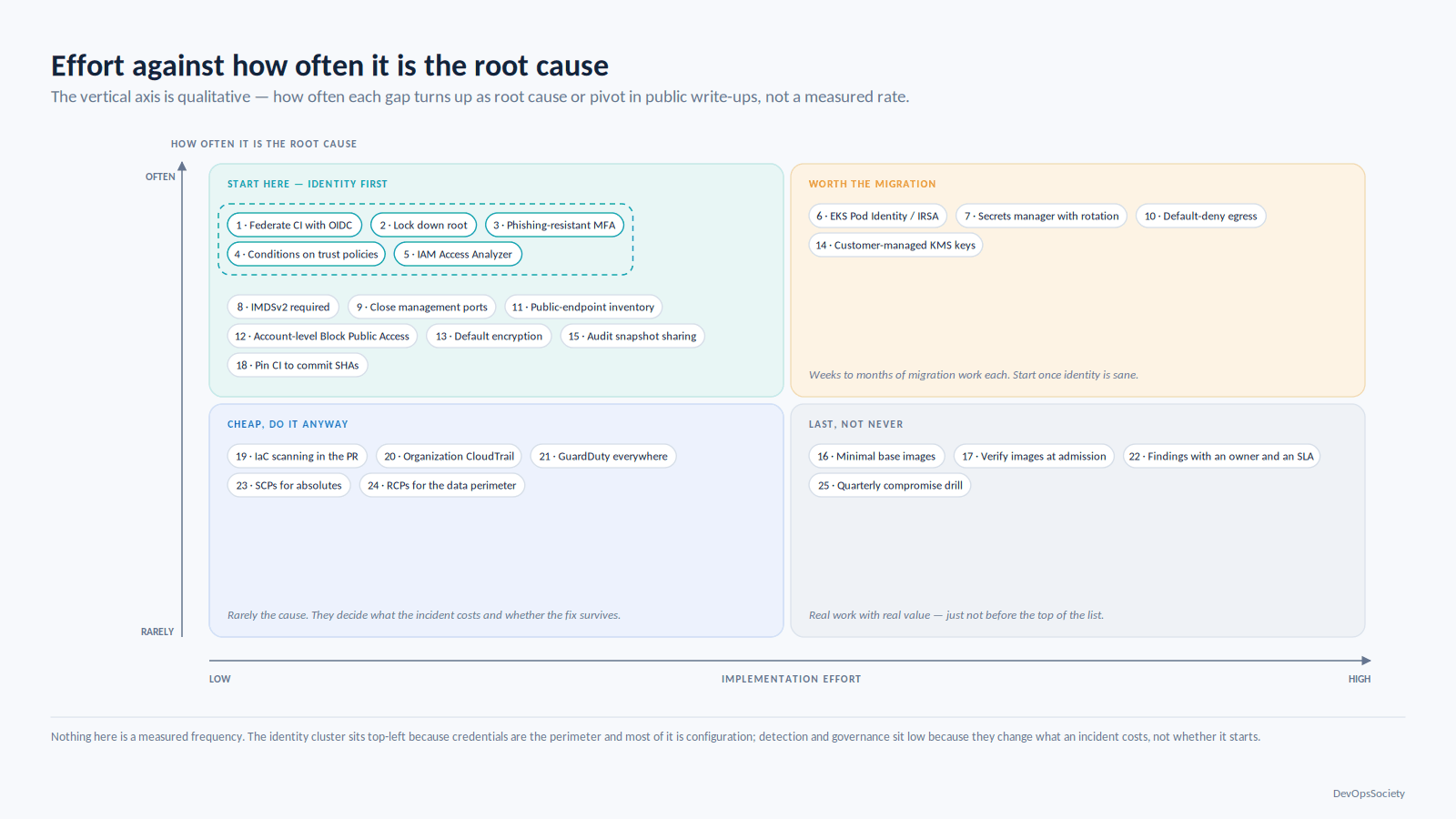
That is the good news, and it is why cloud security best practices are worth writing down as a list at all: the failure set is small and repeatable. These 25 items are ordered by how often each turns up as the root cause or pivot point in real incidents, not by how neat the taxonomy looks. The first seven are worth more than the remaining eighteen combined. If you get budget for a quarter of this, take it from the top.
Why the order is the whole point
Most security checklists are alphabetical or organised by the vendor's product catalogue, so item 1 carries the same weight as item 40 and teams work them in whatever order is easiest. That produces environments with immaculate S3 tagging policies and a decade-old IAM user whose key is in a Jenkins job.
The ordering here follows two things at once: how frequently the gap appears in real compromises, and how cheaply you can close it. Identity comes first because in cloud, identity is the perimeter — once someone holds credentials, your network controls are largely decoration. Network exposure comes second: it sets how many people get to try. Data controls come third: they set what a successful attacker walks away with. Detection comes later not because it matters less, but because detection layered on an environment full of long-lived keys and wildcard roles produces alerts nobody can act on.
Layer | Typical time to close | How often it's the root cause | Do it when |
|---|---|---|---|
Identity and access | Weeks (migration work) | Very frequently | First, always |
Network exposure | Days | Frequently | First quarter |
Data protection | Days (mostly account settings) | Frequently, as the impact multiplier | First quarter |
Workload and supply chain | Months (needs pipeline change) | Growing, especially via CI | After identity is sane |
Detection and response | Weeks to stand up, ongoing to run | Rarely the cause, always the difference in cost | Once signal is meaningful |
Governance | Ongoing | Never directly; it's what stops regression | Continuously, from day one |
Every item below says what to do, why it matters, and what breaks if you skip it. That last part is the one people skim, and the only one that wins the argument with a product manager who wants the sprint. Our wider security coverage treats several of these on their own.
Identity and access: where the real perimeter is
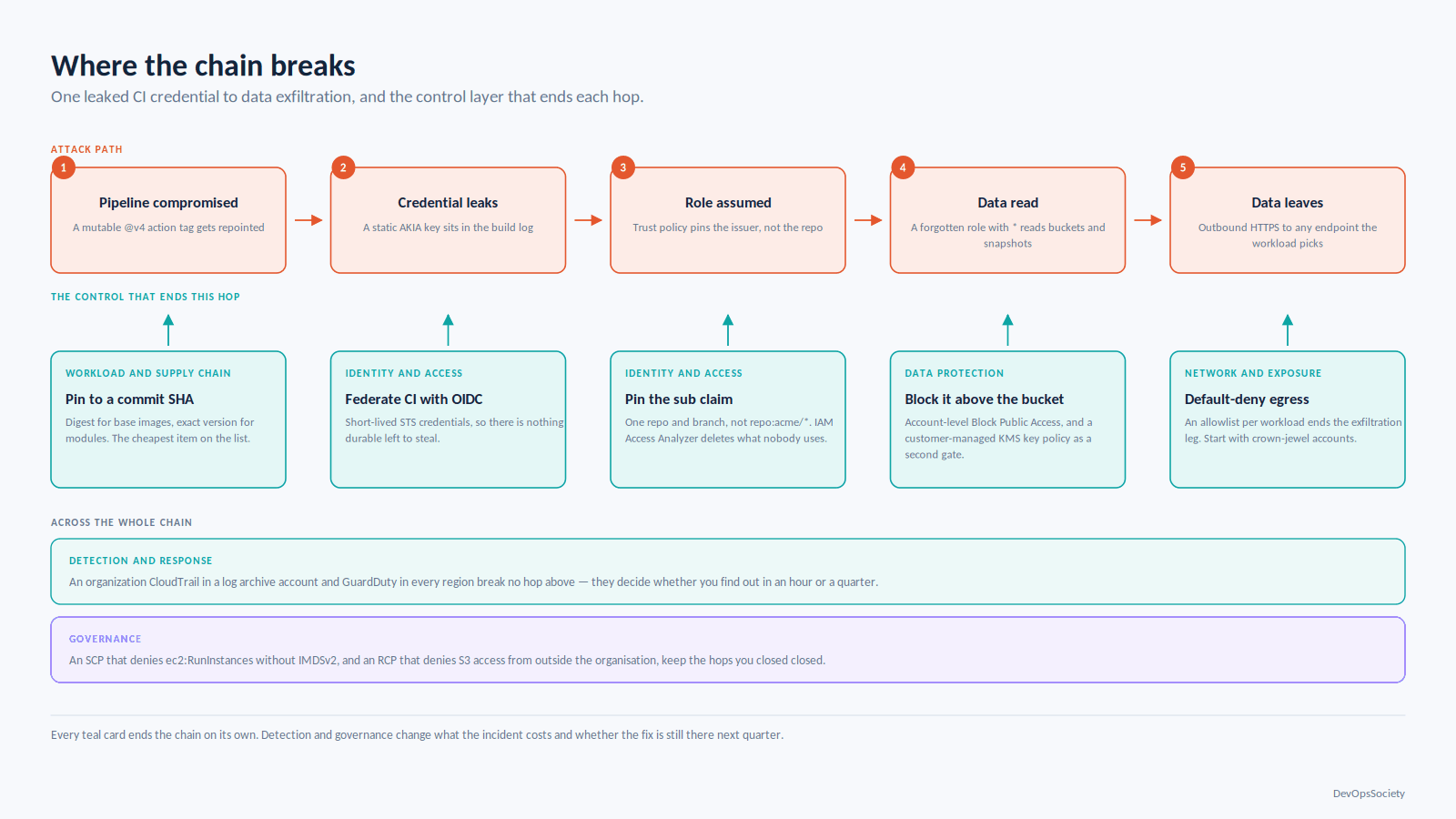
1. Delete long-lived IAM user access keys and federate CI with OIDC. A static AKIA... key has no expiry and no device binding, and it keeps landing in public repositories, container layers, Slack messages and CI logs. Replace human keys with IAM Identity Center sessions and CI keys with OIDC federation — GitHub Actions, GitLab and most modern runners exchange a signed workload token for short-lived STS credentials, so there is nothing durable to steal. Skip it and one leaked key gives an attacker that principal's permissions for as long as it takes someone to notice, typically months.
2. Lock down the root user in every account. Root bypasses IAM policies and most SCP restrictions, and nobody knows who owns the root email for the account someone created in 2021 for a proof of concept. Centralised root access management through Organizations, added in late 2024, removes root credentials from member accounts entirely and performs the few genuinely root-only tasks — like clearing a bucket policy that locked everyone out — from the management account on demand. Without it you have dozens of accounts with a password-reset path into full control, guarded by an inbox.
3. Enforce phishing-resistant MFA for humans at the identity provider. Not per-account IAM MFA, which fragments and drifts, but one identity provider with WebAuthn or a hardware key feeding federated sessions into every account. TOTP beats nothing and still falls to a competent phishing proxy. Skip this and your cloud security best practices reduce to whether an engineer clicks a convincing SSO page at 6pm on a Friday.
4. Put conditions on every trust policy. This is what teams get wrong right after doing item 1 correctly. An OIDC role whose trust policy checks the issuer but not the sub claim can be assumed by any repository on that provider, including a fork or a repo an attacker just created. Pin the specific repository, and ideally the branch or environment.
{
  "Effect": "Allow",
  "Principal": { "Federated": "arn:aws:iam::111122223333:oidc-provider/token.actions.githubusercontent.com" },
  "Action": "sts:AssumeRoleWithWebIdentity",
  "Condition": {
    "StringEquals": { "token.actions.githubusercontent.com:aud": "sts.amazonaws.com" },
    "StringLike":   { "token.actions.githubusercontent.com:sub": "repo:acme/payments-api:ref:refs/heads/main" }
  }
}
The sub line is the whole control. A StringLike of repo:acme/* looks scoped and is not; it trusts every repository in the org, including the one a contractor created last week.
5. Hunt unused permissions with Access Analyzer. Access Analyzer has two halves: external access findings, which show which resources are reachable from outside your trust zone, and unused access findings, which flag roles, users and permissions nobody has touched in a configurable window. The unused-access side is what actually moves you toward least privilege, because it produces a defensible list rather than a philosophical argument. Run it organisation-wide and delete what it finds — an unused role with broad permissions is a ready-made escalation target.
6. Give Kubernetes workloads their own identity. Pods that inherit the node instance role get whatever the noisiest workload on that node needed, which is how a compromised sidecar ends up reading production buckets. IRSA has done this for years by projecting a service account token; EKS Pod Identity, added at the end of 2023, does the same job with a simpler association API, no OIDC provider per cluster and no trust-policy editing per role — at the cost of not working outside EKS. Use Pod Identity for new clusters, keep IRSA where one role is shared across EKS and non-EKS compute. Our guide to running and sizing EKS clusters covers the cluster-level trade-offs around this.
7. Put the credentials you can't federate behind a secrets manager with real rotation. Database passwords, third-party API keys and legacy service accounts cannot all be replaced with short-lived tokens. Those belong in Secrets Manager, Vault or the equivalent, with a rotation function that actually runs and an application that re-reads on failure rather than at boot. The usual failure is theatre: the secret moves into the vault, rotation is configured, the app caches the value at startup, the first real rotation causes an outage, and rotation gets quietly disabled. Test that path before you need it.
Network and exposure: limiting who gets to try
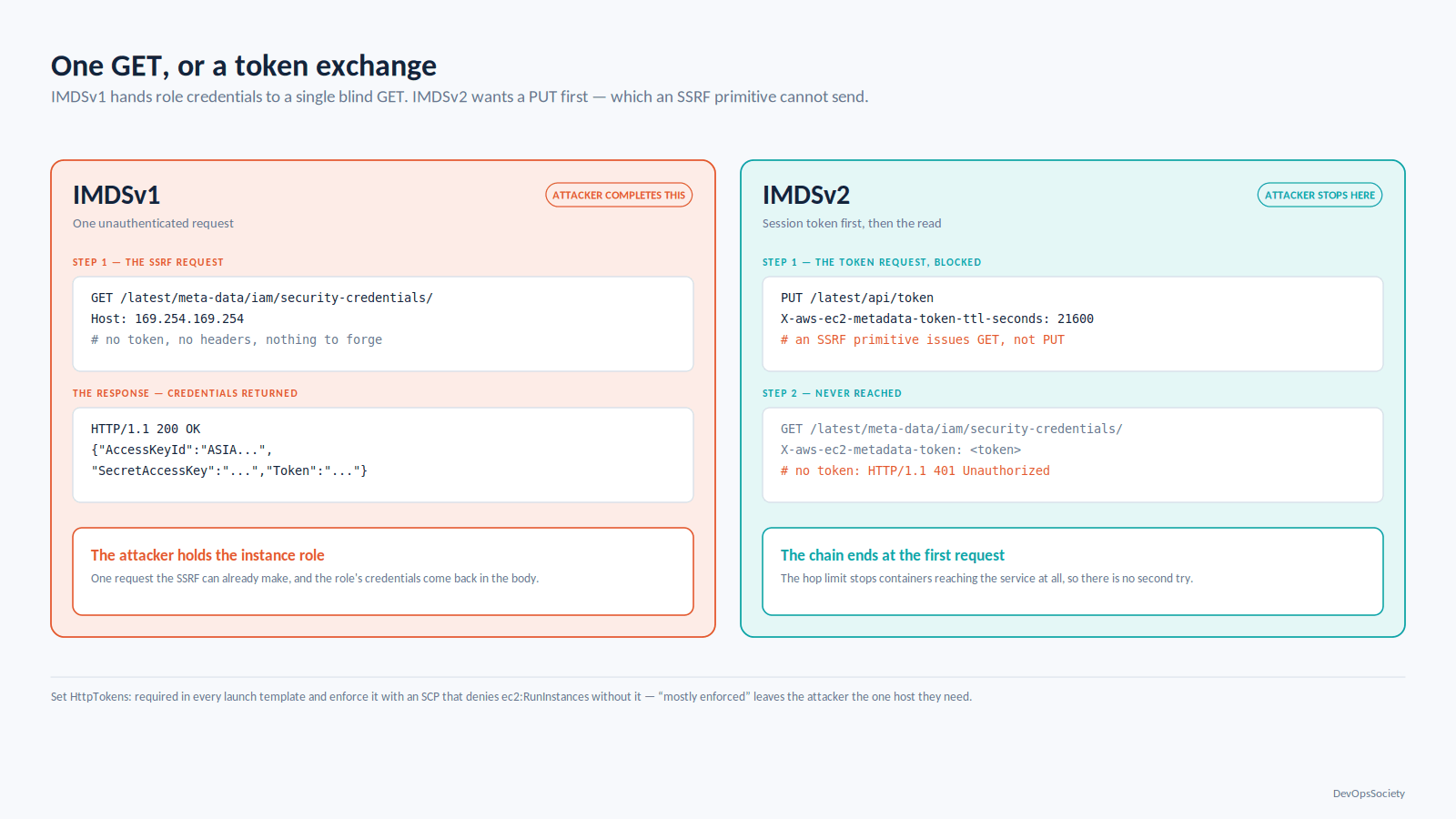
8. Enforce IMDSv2 everywhere. The instance metadata service is how an SSRF bug turns into cloud credentials: one unauthenticated GET to 169.254.169.254 returns the instance role's keys. IMDSv2 requires a PUT for a session token first, which the typical SSRF primitive cannot do, and its hop limit stops containers reaching it. AWS keeps pushing the default forward — newer instance types launch IMDSv2-only and there is an account-level setting for new launches — but existing instances and custom launch templates do not migrate themselves. Set HttpTokens: required in every launch template and enforce it with a policy, because "mostly enforced" gives the attacker exactly the one host they need.
9. Close management ports and use a session broker. SSH and RDP open to 0.0.0.0/0 still show up constantly, usually because someone needed access from a hotel and the temporary rule became permanent. SSM Session Manager gives shell access with no inbound rule, no bastion to patch and a full session log. Without it, your SSH key hygiene and your fail2ban config are the control.
10. Control egress, not just ingress. Most teams write careful ingress rules and leave outbound wide open, so a compromised workload can reach any command-and-control endpoint and stream data out over HTTPS. Default-deny egress with an allowlist is painful to retrofit and easy to apply per-workload on new services. Start with the crown-jewel accounts.
11. Keep a live inventory of what's actually reachable. Nobody intends to expose a database. It happens through a checkbox on an RDS instance, an ALB in a public subnet, or an EKS service that provisions an internet-facing load balancer from an annotation. Run a recurring check — Config rules, Security Hub controls or a scheduled script — answering "what has a public endpoint today", and diff it against yesterday.
# Anything in this account whose snapshots are shared with the world.
aws ec2 describe-snapshots --owner-ids self \
  --query 'Snapshots[].SnapshotId' --output text | tr '\t' '\n' | \
while read -r snap; do
  aws ec2 describe-snapshot-attribute --snapshot-id "$snap" \
    --attribute createVolumePermission \
    --query "CreateVolumePermissions[?Group=='all']" --output text \
    | grep -q all && echo "PUBLIC: $snap"   # 'all' means every AWS account, not just yours
done
Data: limiting what they walk away with
12. Block public access at the account level, not per bucket. Since April 2023 new buckets get S3 Block Public Access on and ACLs disabled by default, which removed the single most common cause of cloud data leaks for anything created since. It did nothing for older buckets, and a determined engineer can still turn it off. Set Block Public Access at the account level so the per-bucket setting cannot override it, and confirm object ownership is BucketOwnerEnforced on the old buckets. The entire "public S3 bucket" genre lives in the gap between the new default and your existing estate.
13. Turn on default encryption and stop thinking about it. EBS encryption by default is an account-and-region setting, off unless you turned it on, and it applies only to volumes created afterwards. S3 now encrypts new objects with SSE-S3 automatically. RDS encryption cannot be added to a running instance without a snapshot-restore cycle. Set the defaults in every region, including the ones you don't think you use, then verify with a config rule rather than trusting the module.
# Account-region guardrail. Apply this to every account via your landing zone,
# not by hand in the console.
resource "aws_ebs_encryption_by_default" "this" {
  enabled = true
}

resource "aws_s3_account_public_access_block" "this" {
  block_public_acls       = true
  block_public_policy     = true
  ignore_public_acls      = true
  restrict_public_buckets = true   # blocks policies granting access to any AWS principal
}
14. Use customer-managed KMS keys where the key policy is a second gate. Service-managed keys protect against disk theft and satisfy auditors. A customer-managed key with a restrictive key policy protects against an over-permissive IAM role, because the caller must be allowed by both policies. Reserve it for data that matters — applying it everywhere adds key management overhead and API cost for no gain on build artifacts.
15. Audit snapshot and AMI sharing. Sharing an EBS snapshot or AMI publicly is a two-click operation that copies an entire filesystem, including whatever credentials were on it, to anyone who looks. It is also nearly invisible: the snapshot stays in your account and nothing in the console shouts about it. Put the CLI check above in a scheduled job. Skip it and you have an unencrypted copy of a production volume readable by anyone, with no log entry when they take it.
Workload and supply chain: the path that's growing
16. Fix the base image before tuning the scanner. A full distribution base image produces hundreds of findings for packages your application never calls, which trains everyone to ignore scan output. A minimal or distroless base collapses that list to something a human will read, and removes the shells and package managers an attacker wants after landing.
17. Verify what you run at admission, not just at build. Signing images with Cosign and verifying at admission — Kyverno, Gatekeeper or equivalent — is what stops a deploy of something your pipeline never produced. Build-time scanning proves one artifact was clean at one moment; it says nothing about what is running now.
18. Pin CI dependencies to immutable references. A GitHub Action referenced as @v4 is a mutable tag the owner — or anyone who compromises them — can repoint. Pin to a full commit SHA. Same for base images (digest, not latest) and Terraform modules (exact version, not a range). Cheapest item here, and it closes the exact path used in the CI supply-chain attacks of recent years.
19. Scan infrastructure code in the pull request and watch for drift. IaC scanning has the best effort-to-value ratio of any scanner category: unambiguous findings, two-line fixes. Run Checkov or Trivy diff-scoped on changed files in the PR, and separately detect drift between state and reality — the console change made during an incident is the one that bites. Our piece on integrating security checks into the pipeline covers where each gate belongs and what should block a build.
Detection and response: shortening the expensive part
20. One organization CloudTrail, all regions, in an account nobody can write to. The classic gap is a trail configured per-account, in the regions someone remembered, with the bucket in the account the attacker just compromised. A multi-region organization trail catches the forgotten region; delivery to a dedicated log archive account with a deny-delete bucket policy and Object Lock means the logs survive the incident. Skip it and forensics start at "we don't know what they did."
21. GuardDuty in every account and region, with findings aggregated. GuardDuty analyses CloudTrail, VPC flow logs and DNS logs, plus S3 data events, EKS audit logs and runtime activity with the relevant protection plans on. Extended Threat Detection correlates those signals into multi-step attack sequences instead of firing twenty unconnected alerts. Enable it organisation-wide with auto-enrolment for new accounts, aggregate into Security Hub under a delegated administrator, and remember that the regions you never use are exactly where crypto-mining shows up.
22. Route findings to an owner with a clock on them. A Security Hub dashboard with thousands of findings is not detection, it's a museum. Pick the small set that means "act now" — root login, disabled CloudTrail, new public S3 or snapshot, GuardDuty high severity, unrecognised OIDC provider — and page on those. Everything else goes to a ticket queue with a named owner and an SLA. Without this, items 20 and 21 cost money and buy nothing.
Governance: what stops it all from regressing
23. Use SCPs for the short list of things that must never happen. SCPs set the permission ceiling for an OU regardless of what an account's own IAM says, which makes them right for absolutes: don't disable CloudTrail or GuardDuty, don't leave the organisation, don't delete the log archive bucket, don't launch without IMDSv2. Keep the list short — sprawling SCPs produce inexplicable access denials that cost a senior engineer an afternoon.
{
  "Sid": "DenyInstanceLaunchWithoutIMDSv2",
  "Effect": "Deny",
  "Action": "ec2:RunInstances",
  "Resource": "arn:aws:ec2:*:*:instance/*",
  "Condition": {
    "StringNotEquals": { "ec2:MetadataHttpTokens": "required" }
  }
}
24. Add resource control policies for the data perimeter. RCPs, added in late 2024, are the mirror image of SCPs: they sit on the resource side and constrain who can access your resources no matter what a resource-based policy says. They cover a limited set of services — S3, STS, KMS, SQS and Secrets Manager among them — which is most of where cross-account data exposure starts. An RCP denying S3 access to principals outside your organisation structurally closes the "someone pasted a wildcard into a bucket policy" path.
25. Rehearse credential compromise once a quarter. Pick a scenario — a leaked CI key, a compromised laptop, an engineer who left with a valid session — and run it. You are testing whether you can enumerate what that principal could reach, revoke active sessions (which needs an aws:TokenIssueTime condition, not just key deletion) and rotate whatever it touched, inside an hour. Most teams discover mid-rehearsal that nobody knows which roles the key could assume. That is the finding.
How to keep cloud security best practices from becoming a ritual
The failure mode for a list of cloud security best practices is that it becomes a spreadsheet reviewed quarterly, where every row is green because green means "we have a policy about this" rather than "this is enforced and we checked."
Three things prevent that. First, express each item as an automated control, not a document — an SCP, a Config rule, a CI gate, a scheduled script. If it isn't enforced by something that runs without a human, it will drift within two quarters. Second, make the secure path the easy path: a module that provisions a bucket with encryption, Block Public Access and logging already set is adopted because it saves time, not because a policy demands it. That's the argument for building this into whatever paved-road platform your teams already use rather than into a compliance checklist. Third, track your own exceptions. Every control has legitimate exceptions; the question is whether they are recorded with an owner and an expiry, or whether the exception list is the environment.
Starting Monday, the sequence is: audit for long-lived access keys and set a deletion date; enable account-level S3 Block Public Access and EBS default encryption in every region (an afternoon of Terraform); turn on GuardDuty and an organization CloudTrail org-wide; put conditions on every OIDC trust policy you own. Four of the top items, achievable in a sprint, and they remove most of the paths that show up in the incident reports.